A rate limit refuses a specific caller that has sent more than its share. It is configured per edge from central, so you can change it without redeploying, and every policy starts in a mode that only counts. You need an edge that is already registered and an operator with edges:manage; edges:read shows the policies and nothing more. auth has its own limits for the channel that is not mutual TLS, described below.
Rate limits and overload protection
They answer different questions and never share a counter.
| Rate limits | Overload protection | |
|---|---|---|
| Question | Is this caller over its share? | Can this pod take more work right now? |
| Refuses | The caller that exceeded its bucket; others are unaffected. | Whoever arrives past the pod’s capacity, by priority. |
| Limit | A number you set per policy. | Learned from call times and executor lag. |
| Answer | 429 with Retry-After | 503 with Retry-After |
Overload protection is the outer layer: under overload a request is refused there before a rate limit sees it.
Start from the recommended set
Without a starting point you would have to guess numbers, so central serves one. Add recommended policies in the console (or GET /configuration/edges/rate-limits/recommended) gives five policies, all in shadow:
| Policy | Counts | Limit |
|---|---|---|
per-client | each OAuth client | 120,000 a minute, bursts of 5,000 |
per-user | each user | 300 a minute and 5,000 an hour, bursts of 60 |
per-user-endpoint | each user on each endpoint | 120 a minute, bursts of 30 |
per-address | each address, failed and unauthenticated attempts and logins | 600 a minute, bursts of 100 |
per-certificate | each client certificate on the mutual-TLS listener | 60,000 a minute, bursts of 2,000 |
The numbers are generous on purpose: they catch a runaway client, user or address, not a busy one. They are per edge pod unless you set the number of pods (see Edge pods). per-address is meaningful only when the edge sees the real client address, see Which address.
Policies
A policy is a set of fields. The set is replaced as a whole. The API has no implicit values: send every field, with the usual value when you have no preference (the console does).
| Field | Usual value | Meaning |
|---|---|---|
name | none | 1 to 48 characters: a lower-case letter, then lower-case letters, digits, _ or -. Unique on the edge. It labels the metrics and the refusal. |
by | none | What a bucket is keyed on: client, subject, session, jkt (the DPoP key), ip or certificate. Empty means one bucket for the whole scope. ip and certificate stand alone. |
scope | edge-wide | edge-wide, resource or endpoint. A narrower scope keeps one bucket per key and resource, or per key and registered endpoint. |
limits | none | 1 to 8 windows, each limit requests per windowSeconds. Every window must pass. Windows of one policy are distinct. |
burst | 1 | How many requests may arrive together. Not above the smallest limit. 1 is strict spacing. |
cost | 1 | What one request takes from the bucket. Not above burst. |
mode | shadow | off ignores the policy, shadow counts what would be refused and refuses nothing, enforce refuses. |
At most 64 policies per edge, limit 1 to 1,000,000, windowSeconds 1 to 86,400. A request is checked against every policy that applies, and is charged on all of them only if all pass.
Where a request is checked
| Checkpoint | When | Keys |
|---|---|---|
| R1, address | Before the token is read, on the plain listener | The caller’s address. Counts failed and unauthenticated attempts only, plus every call to the entry points (/login, /complete, /native/start, /native/complete, /logout). A successful call is never limited by address. |
| R1, certificate | Before the token is read, on the mutual-TLS listener | The verified client certificate’s SHA-256 thumbprint. Every call counts. |
| R2 | After the access token is verified, before the revocation check and the DPoP proof | client, subject, session, jkt of the token |
| R3 | After the endpoint and the caller’s permissions are resolved, before /userinfo and the resource | The resource and the registered endpoint, with the token’s keys |
A request refused at R2 reaches neither the revocation check, the DPoP check, /userinfo nor your resource. A call refused at R3 has already had its DPoP proof recorded. A refresh that the edge makes for a cookie session happens before R2 and is not counted separately.
An address limit counts failures only because many honest users sit behind one carrier or office address; counting their successful calls would refuse them for each other’s traffic. It is approximate under concurrency: requests of one address already in flight when its bucket empties all pass, so a burst of concurrent failures can exceed the limit by about the address’s concurrency.
Set it in the console
Open Edges, open the edge, and use Edit on the Rate limits card. The editor opens in the side panel with a block per policy: name, mode, what to count by, scope, the windows, and burst and cost under Advanced. An empty edge offers Add recommended policies; Add policy adds a blank one.
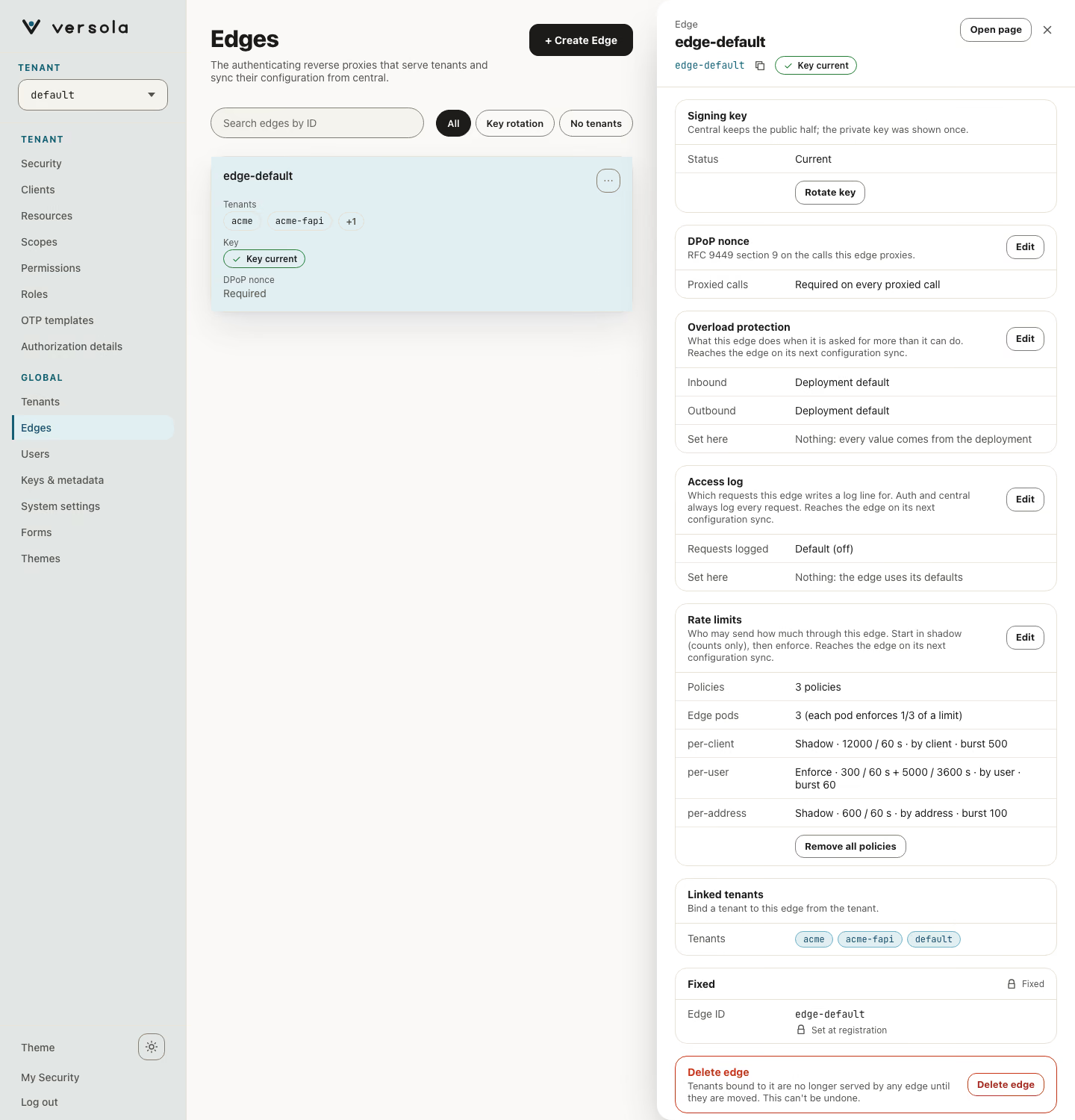
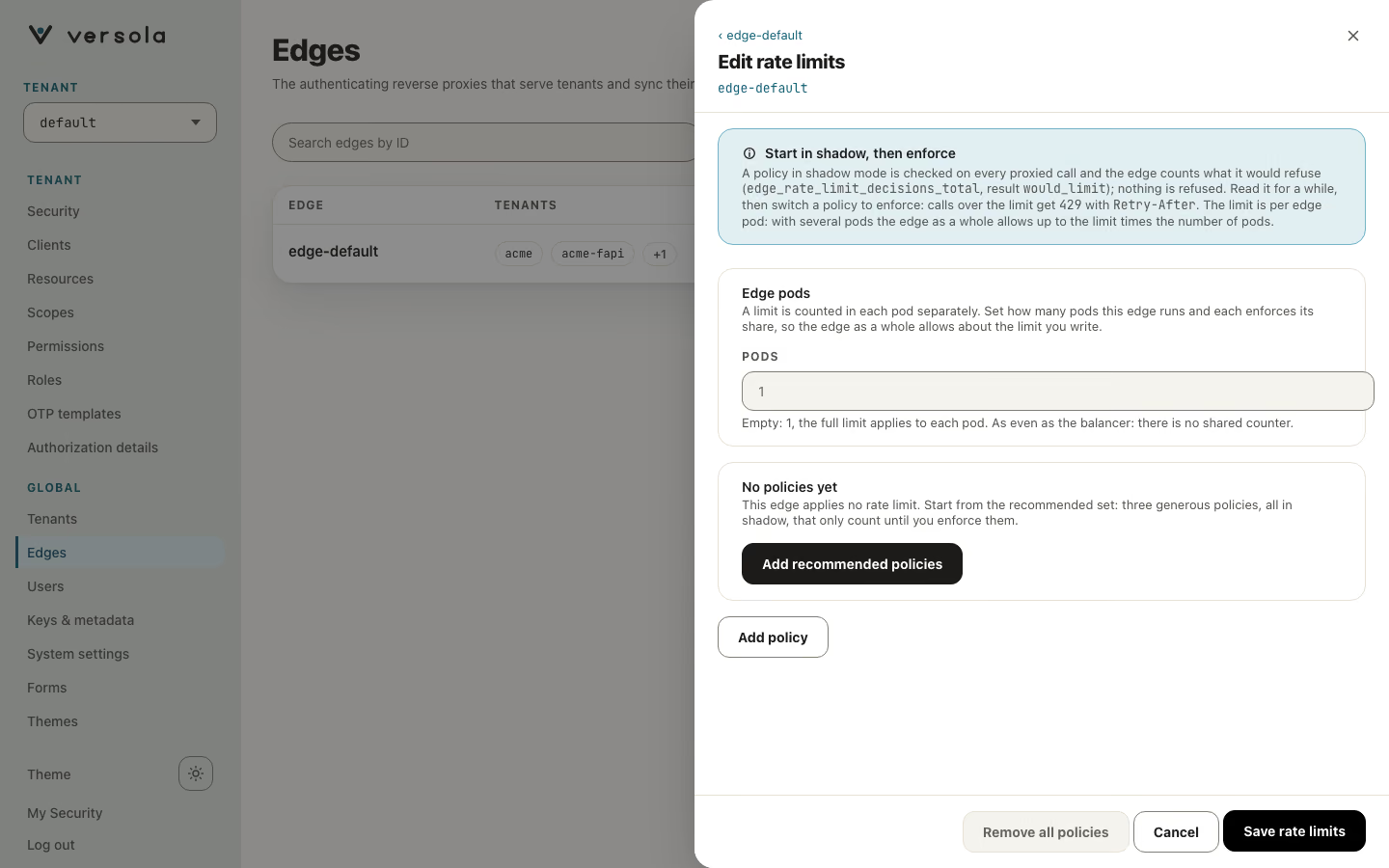
The editor checks the same rules as central as you type and does not send a set that fails them. Remove all policies sends an empty set after a confirmation. A change reaches the edge on its next configuration sync, inside the refresh interval (5 minutes by default); while central is unreachable the edge keeps the last set it received.
Set it by API
All of an edge’s policies are one resource: GET and PATCH /configuration/edges/policies?edgeId=<id>. The sections are overload, accessLog and rateLimits. A section that is absent from the body is kept, null removes it, and an object replaces it as a whole. A section that fails validation, or a key that is not a section, answers 400 with no body: the first problem found is in central’s log. The console checks the same rules before it sends, so a 400 is a script’s mistake. Every field of a policy and replicas are required; nothing has an implicit value. The schemas are EdgePolicies and EdgePoliciesPatch in the central OpenAPI file.
{
  "rateLimits": {
    "replicas": 3,
    "policies": [
      {
        "name": "per-user",
        "by": ["subject"],
        "scope": "edge-wide",
        "limits": [{ "limit": 300, "windowSeconds": 60 }],
        "burst": 60,
        "cost": 1,
        "mode": "enforce"
      }
    ]
  },
  "expectedRevisions": { "rateLimits": 4 }
}
Two things make this safe to call from a script. expectedRevisions names, per section, the revision you last read (GET returns revisions and updatedAt): if a named section has changed since, nothing is written and the answer is 409 with no body (read the state again with GET); a section you do not name has no precondition, so a client that only patches its own section needs none. And dryRun=true checks the body by the rules the edge applies and answers the state the patch would make, without writing it. The answer to a real patch is the new state, with the new revisions.
Limits the owner of an API declares
A limit can also be declared where the API is declared, so its owner protects it there and the limit travels with it. It is the same idea as a policy, with the fields that make no sense there left out. The owner of a client sets nothing about how much of an API it may take: the resource does.
| Where | Set it | Checked | Bucket |
|---|---|---|---|
| A resource endpoint | The folded Rate limit panel of Edit endpoints, or rateLimit in the endpoint of POST and PUT /configuration/resources | At R3, for that endpoint | Per key and registered endpoint |
| A client of the resource’s audience | The folded Rate limits box of Edit audience, or audienceRateLimits on the resource in POST and PUT /configuration/resources | At R3, for that client’s calls to this resource, on any endpoint | Per key, for that client on that resource |
| Field | Usual value | Meaning |
|---|---|---|
limits | none | 1 to 8 windows, each limit requests per windowSeconds, as in a policy. |
burst | 1 | As in a policy. Not above the smallest limit. |
by | none | none: one bucket for the endpoint, or for the client on the resource. subject: one per user. client: one per OAuth client, on an endpoint only; for an audience client it would mean the same as none, so central refuses it. |
mode | shadow | off, shadow or enforce, as in a policy. |
cost is always 1. central applies the rules of a policy and answers 400 with no body when one is broken (it also refuses an audience client that is not in the audience and a client listed twice); the reason is in central’s log. Send burst, by and mode with limits; nothing has an implicit value, and audienceRateLimits is required when you create a resource ([] for none). An absent rateLimit means no limit. An endpoint is written whole, so send its rateLimit again when you edit it, or it is removed. audienceRateLimits is a list of { "clientId", "rateLimit" }: on PUT it replaces the whole list, an absent field leaves it alone, and a client removed from the audience loses its entry.
{
  "resourceId": "orders-api",
  "audienceRateLimits": [
    {
      "clientId": "acme-web",
      "rateLimit": {
        "limits": [{ "limit": 600, "windowSeconds": 60 }],
        "burst": 50,
        "by": "subject",
        "mode": "shadow"
      }
    }
  ]
}
A declared limit adds to the edge’s policies and does not replace them. A request must pass every limit that applies to it, so the effective limit is the smallest. A declared limit is divided by replicas like any other. In the metrics it is the policy resource-endpoint or resource-client, never the endpoint, the resource or the client, so the label set stays closed, and a refusal names the same policy. These two names are reserved: an edge policy cannot take them. Each declaration keeps up to 10,000 keys.
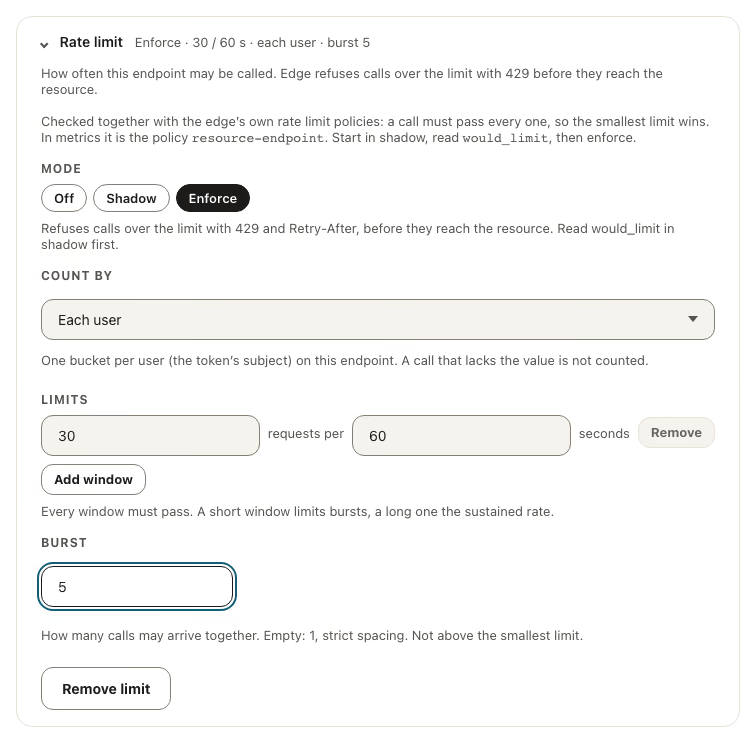
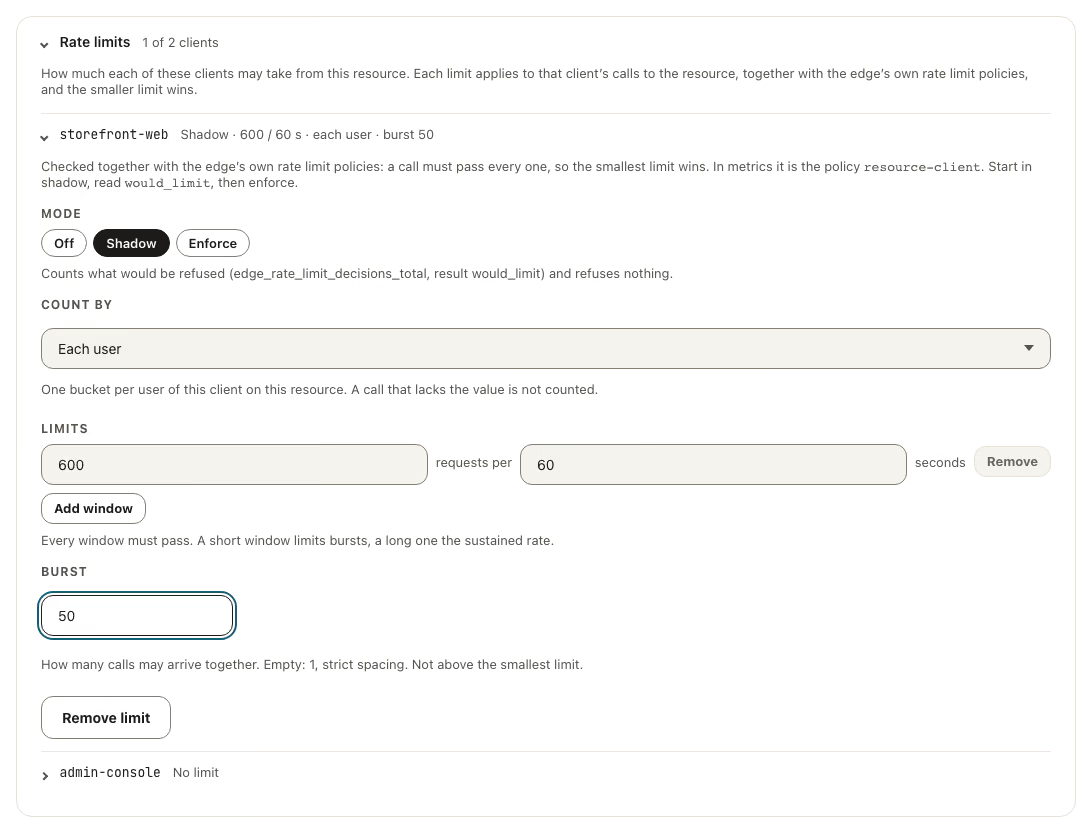
An edge and a central that do not know the fields ignore them, so either can be upgraded first. Start every declared limit in shadow, read would_limit as in Roll it out, then switch it to enforce.
Edge pods
Each pod counts on its own: there is no shared counter and no network call on the request path. Set replicas to the number of pods of the edge and each pod enforces limit / replicas of every window (and burst / replicas, rounded up, never below cost), so the edge as a whole allows about the limit you wrote. It is as exact as your load balancer is even. Left at 1, the limit applies to each pod and N pods allow N times it. Change it when the number of pods changes, or let the edge count them: set replicas-from = "dns:<name>" in its configuration file, with <name> a headless Service that lists the ready pods. The Kubernetes chart ships one, <fullname>-edge-headless, and puts its name in the environment variable VERSOLA_EDGE_HEADLESS_SERVICE of the edge pods, so the configuration file can say replicas-from = "dns:"${VERSOLA_EDGE_HEADLESS_SERVICE}. The edge resolves it every 10 seconds, keeps the last count if a lookup fails, and uses the policy’s replicas until the first answer. Nothing detects Kubernetes by itself: without the key, replicas is used. edge_rate_limit_replicas{source} (dns or policy) shows the number in force.
Which address
The address of a caller comes from the edge’s configuration file:
| Key | Default | Meaning |
|---|---|---|
client-ip | socket | socket is the peer of the connection. forwarded reads the header named by client-ip-header. |
client-ip-header | X-Real-IP | The header a proxy sets with the client address. |
Set forwarded only when the edge is reachable solely through the proxy that sets the header (the compose network, the chart’s network policy): anything else could write the header and choose its own bucket. A header that is missing or is not an IP address falls back to the peer. IPv4 is keyed by address, IPv6 by its /64. Behind a proxy with socket, every caller is the proxy, so an address limit would count the whole world as one caller; edge_client_address_total{source} (socket, forwarded, forwarded_missing) shows what the edge saw. Inside a Kubernetes cluster, a call through a Service from a pod on another node reaches the edge with the node’s address, so pods on one node share one address behind kube-proxy; put a proxy that sets the header in front and use forwarded. Whether a cloud load balancer passes the client address to the pods depends on the platform: check it before you enforce an address policy.
What a refused caller sees
429 Too Many Requests with:
Retry-After: the wait in whole seconds, rounded up (the longest wait among the policies that refused);RateLimit-Policy: "<name>";q=<quota>;w=<window seconds>andRateLimit: "<name>";r=0;t=<wait>, as in the IETF draftdraft-ietf-httpapi-ratelimit-headers. The draft has changed between versions, so these fields are sent on a refusal only, never on a successful response;- no body. The policy is named in
RateLimit-Policy; a key is never named.
A client should wait at least Retry-After, add jitter and retry a bounded number of times. A refusal is cheap: it is counted, and its log line follows the success rules (written when slow or sampled), so a flood does not become a flood of log lines. What an operator reads instead is one line a minute per policy that refused something, WARN when the policy enforced and INFO when it only counted in shadow, with the policy’s name and the counts and no key.
Roll it out
- Add the recommended set and leave it in
shadowthrough at least a week of real traffic that includes a peak. - Read
edge_rate_limit_decisions_total{policy,result="would_limit"}. Near zero means a policy is not in the way. Manywould_limitfor honest callers mean the number is too low for them: raise it first. - Set
replicasto the number of edge pods. - Switch one policy to
enforceon one edge, watchlimitedand your clients’ errors through a peak, then do the next.shadoworoffis the off switch. - Enforce an address policy last, after
edge_client_address_totalshowsforwardedand notsocketbehind a proxy.
Read the metrics
| Metric | What it tells you |
|---|---|
edge_rate_limit_decisions_total{policy,result} | allowed, limited (refused) and would_limit (what shadow would refuse), by policy. |
edge_rate_limit_tracked_keys{policy} | Keys held per policy. |
edge_rate_limit_overflow_hits_total{policy} | New keys past the cap of 100,000 per policy, which share one bucket; a rise means a flood of distinct keys. |
edge_client_address_total{source} | How the edge found the address of a caller. |
edge_rate_limit_replicas{source} | The number of pods each pod divides a limit by, and where it came from (dns or policy). |
A key is never a metric label. The Versola Grafana board has a rate limits row for the edge and for auth (refused and would-be-refused by policy, the share of calls a policy refuses, keys tracked, the pods the limit is divided by, where the address comes from) and an overload protection row for each service.
Limits on auth
auth reached without the edge, that is not over mutual TLS, is exposed directly, so it has limits of its own, set in the limits block of its configuration file. Every key is optional and the block may be absent.
| Limit | Applies to | Counts | Default |
|---|---|---|---|
| Failed client authentication | POST /token, /par, /introspect, /revoke | An address’s failures only (401, or invalid_client) | enforce, 20 a minute, bursts of 10 |
| Entry | /authorize | Every call, by address | shadow, 600 a minute, bursts of 100 |
An address over its failed-authentication limit is refused with 429, Retry-After and the RateLimit fields, with no body, before its next request is read, however good the credential in it. A client that authenticates is never limited. The mutual-TLS listener is not limited this way: a certificate is not a guessable secret.
limits {
  failed-mode = "enforce"     # off | shadow | enforce
  failed-per-minute = 20
  failed-burst = 10
  entry-mode = "shadow"
  entry-per-minute = 600
  entry-burst = 100
  client-ip = "socket"        # socket | forwarded
  ip-header = "X-Real-IP"
}
A value outside its range stops the start. client-ip works as on the edge. State is per pod. A deployment that fails client authentication in bulk from one address on purpose (a load campaign, a test suite) should set failed-mode to shadow for that run. The metrics are auth_rate_limit_decisions_total{policy,result} (policies failed-client-auth-per-address and authorize-per-address), auth_rate_limit_tracked_keys and auth_rate_limit_overflow_hits_total.
What is not there
- Partner-run edges tightening limits locally (partner mode is not implemented).
- A counter shared by several pods; use
replicasfor an even split.
Next steps
- Overload protection — what the edge does when it is asked for more than it can serve
- Edges — the screen this page adds a card to
- Edge configuration — the file
client-iplives in