A resource is an upstream API that sits behind edge. Registering it tells edge where to forward traffic, which clients may request tokens for it, and which rules apply to each endpoint. For the conceptual picture, see Entities.
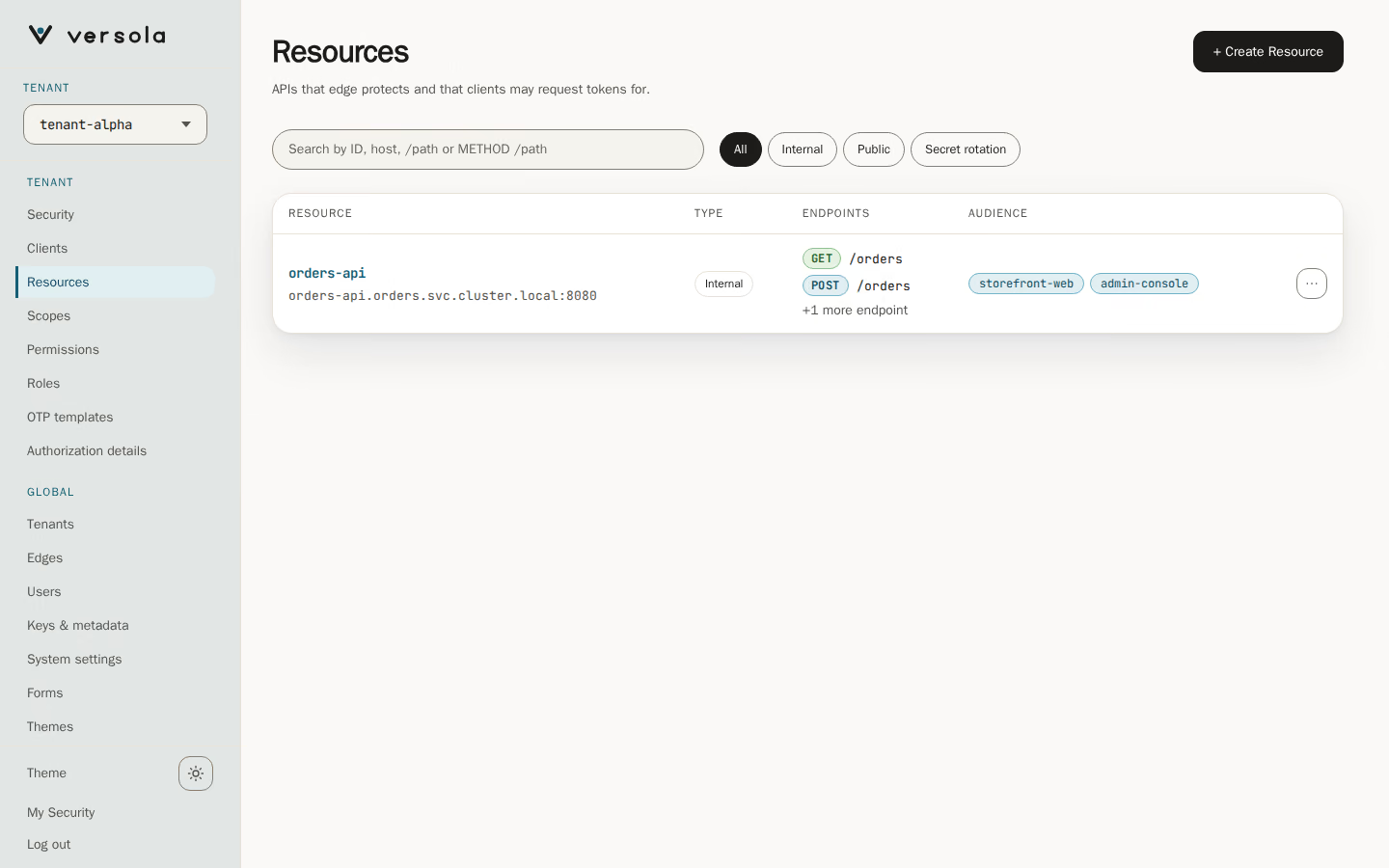
A row opens the resource’s page. The row menu offers Open, Copy ID and Delete resource. Search matches the ID, the host, a /path or a METHOD /path; searching for an endpoint lists the resources that have it.
The page
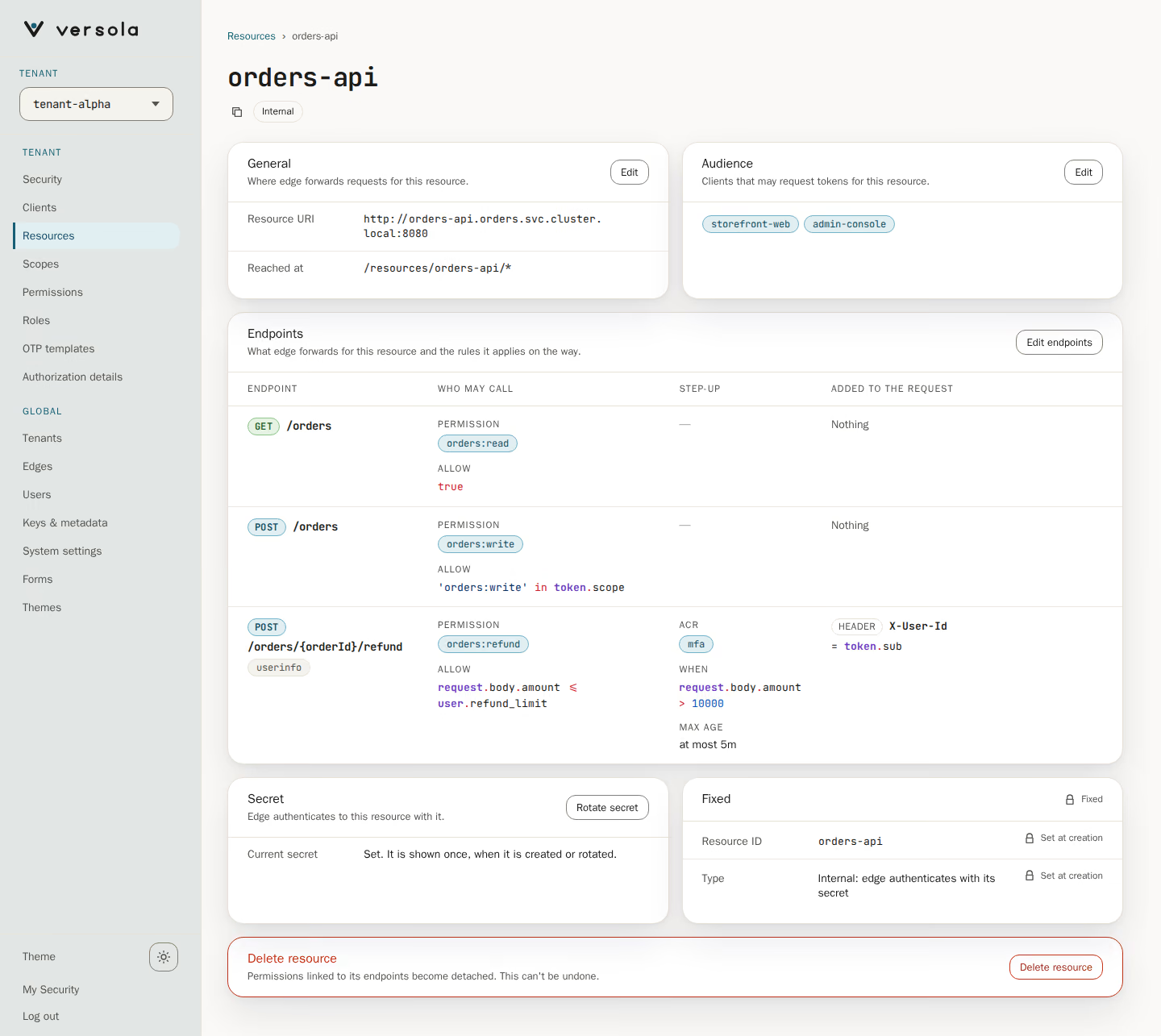
The page opens read-only. The title is the resource ID, with a copy button and chips for the type (Internal or Public) and, while a rotation is open, Secret rotation. Each card below has its own Edit that opens only that group as a page, with Cancel and a Save button named for the group.
| Card | What it shows | Editor |
|---|---|---|
| General | Resource URI and Reached at, the route /resources/{resourceId}/* that edge forwards to the URI | Edit general |
| Audience | The clients that may request tokens for the resource, and under them one line for each client the resource limits. A client tag opens that client | Edit audience |
| Endpoints | A table with the rules of every endpoint | Edit endpoints |
| Secret | Internal resources only: whether a secret is set and whether a new one waits for activation | Rotate secret, then Activate new secret |
| Fixed | Resource ID and Type, both set at creation | None |
| Delete resource | Last on the page | None |
A read-only console shows the same cards without the buttons.
Fields
| Field | What it is | Rules |
|---|---|---|
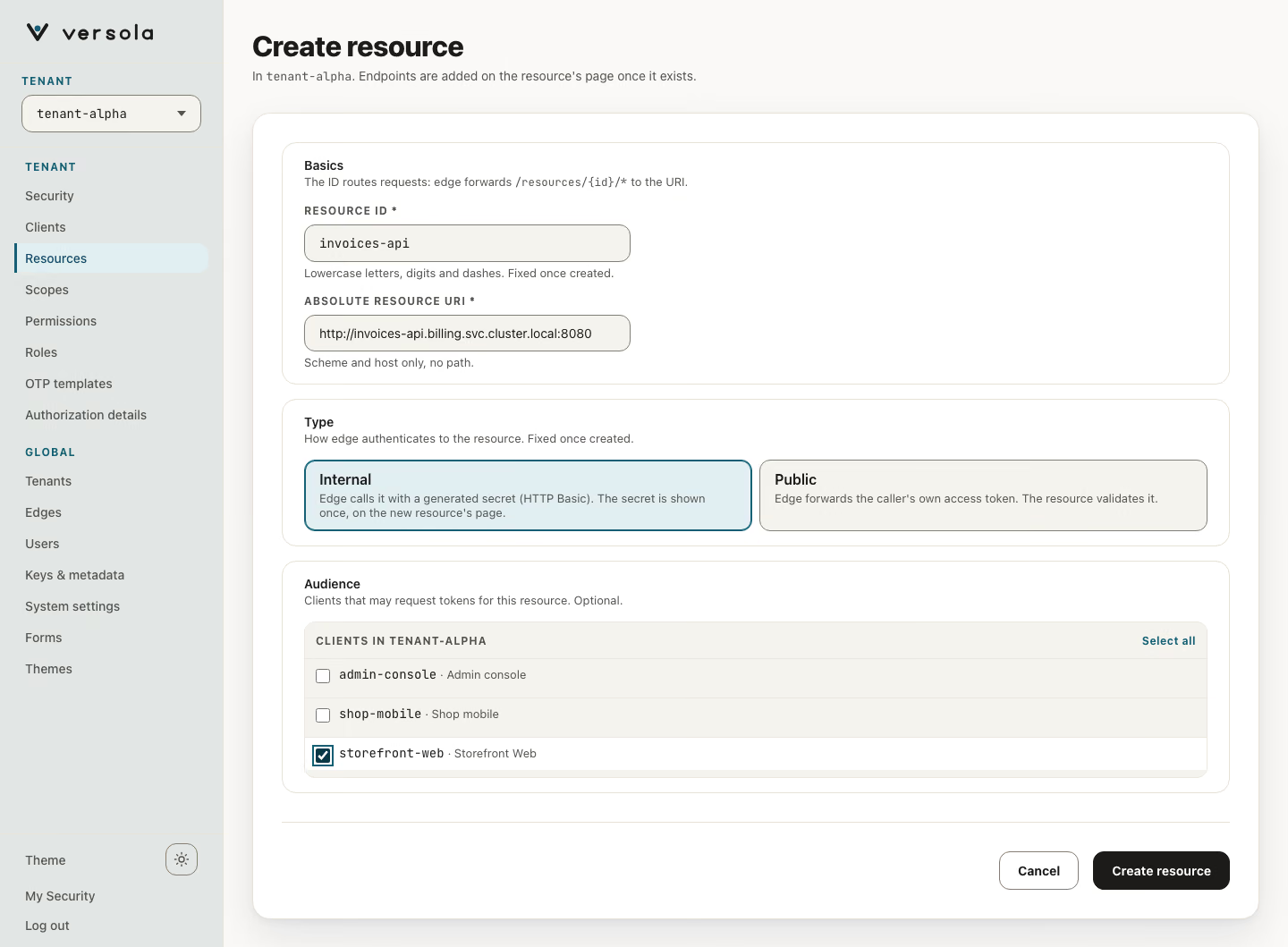
| Resource ID | The name in the proxy path: edge forwards /resources/{resourceId}/* to the resource URI | Lowercase letters, digits and hyphens, starting with a letter (^[a-z][a-z0-9-]*$). edge is reserved. Unique across the installation, not only within the tenant. Cannot be changed after creation |
| Absolute resource URI | Where edge sends the request | An absolute URI with scheme and host, no path (not even a trailing /), no query, no fragment. The resource:// scheme is reserved. You can change it later |
| Audience | The clients allowed to request this resource | Clients of the same tenant, picked from a list with a filter and Select all. A client that is not listed cannot get a token for the resource. A client that no longer exists stays in the list until you untick it |
| Type | Internal or Public | Chosen at creation. It is fixed afterwards |
| Endpoints | The method and path pairs edge accepts, each with its policy | See below |
The console and the Central API set no maximum length for these values.
Public and internal
| Public | Internal | |
|---|---|---|
| Secret | None | Generated by Versola |
What edge sends upstream in Authorization | The caller’s access token as Bearer, unchanged. The resource must validate it | Basic with the resource ID as user and the resource secret as password. The caller’s token is not forwarded |
aud of the issued token | The resource URI | resource://{resourceId} |
| Who validates the caller | The resource itself, from the token | edge. The upstream only checks the Basic credentials, so keep it reachable from edge alone |
Both types go through the same checks in edge: audience, permissions and the endpoint policy. See Edge overview for the request lifecycle.
Limits for audience clients
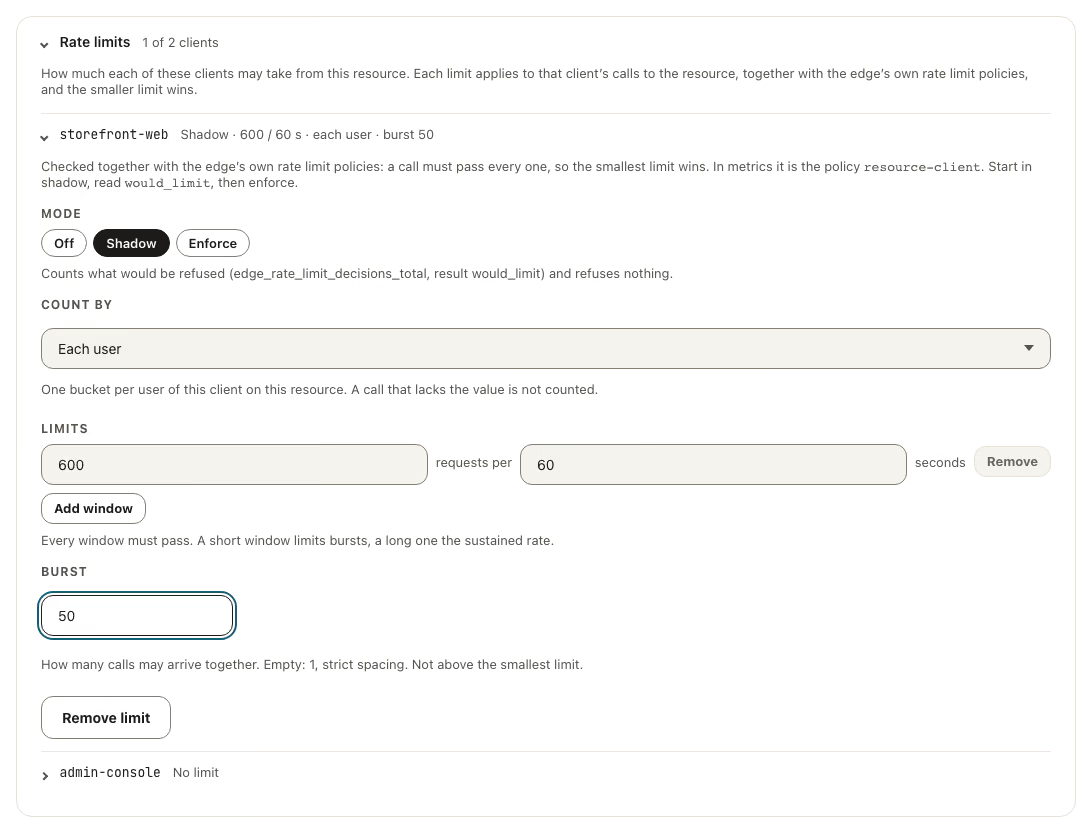
The resource, not the client, says how much each client of its audience may take. Edit audience has a folded Rate limits box under the client list: open it to see one fold per client of the audience, each showing No limit or a summary, and open a client to set its limit (Set a limit, then Mode, Count by (The client as a whole or Each user), the windows and the Burst). The limit applies to that client’s calls to this resource, on any endpoint, together with the edge’s own rate limit policies, and the smaller limit wins. A client that leaves the audience loses its limit. The owner of a client sets nothing about how much it may take from an API.
Endpoints and their policy
An endpoint is the unit of authorization. Each one has a method (GET, POST, PUT, PATCH or DELETE) and a relative path. The path starts with /. Each segment is a literal of letters, digits and hyphens, or a {name} parameter that matches exactly one segment. Parameter names are unique within the path, and two endpoints with the same method cannot differ only in their parameter names. A literal endpoint wins over a parameterised one.
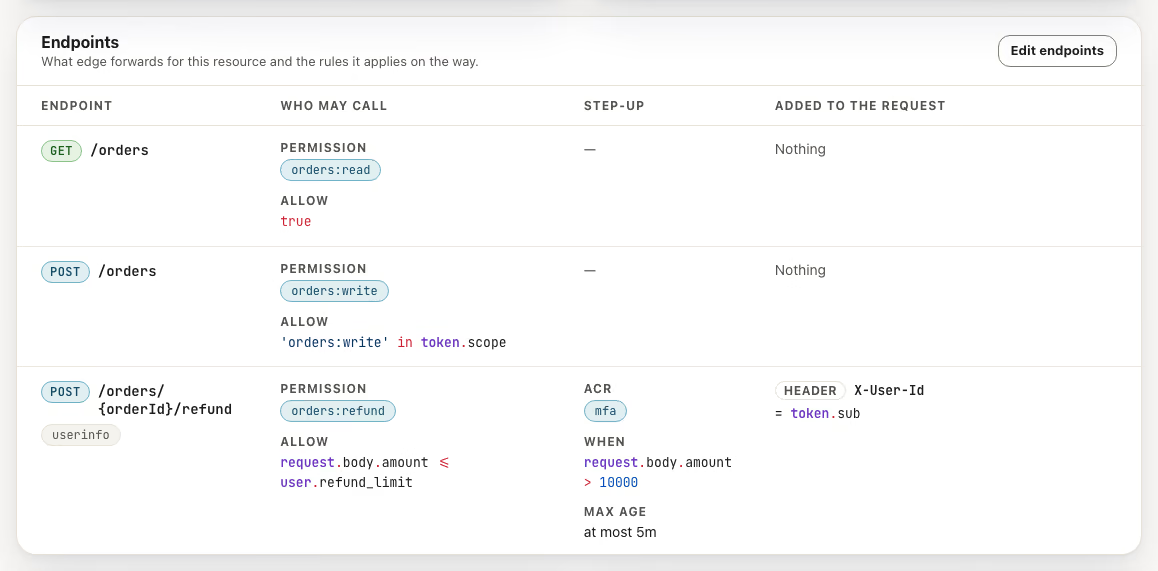
The Endpoints card is a table whose columns answer what you need to know without opening an editor:
| Column | What it shows |
|---|---|
| Endpoint | The method, the path and a userinfo tag when Fetch userinfo is on |
| Who may call | The permissions that cover the endpoint, joined by or (any one is enough), and the Allow rule, or No extra check |
| Step-up | The ACR values, the condition that asks for them and the maximum age of the sign-in (at most 5m; the exact seconds are in its tooltip) |
| Added to the request | The inject rules, as HEADER X-User-Id = token.sub, or Nothing |
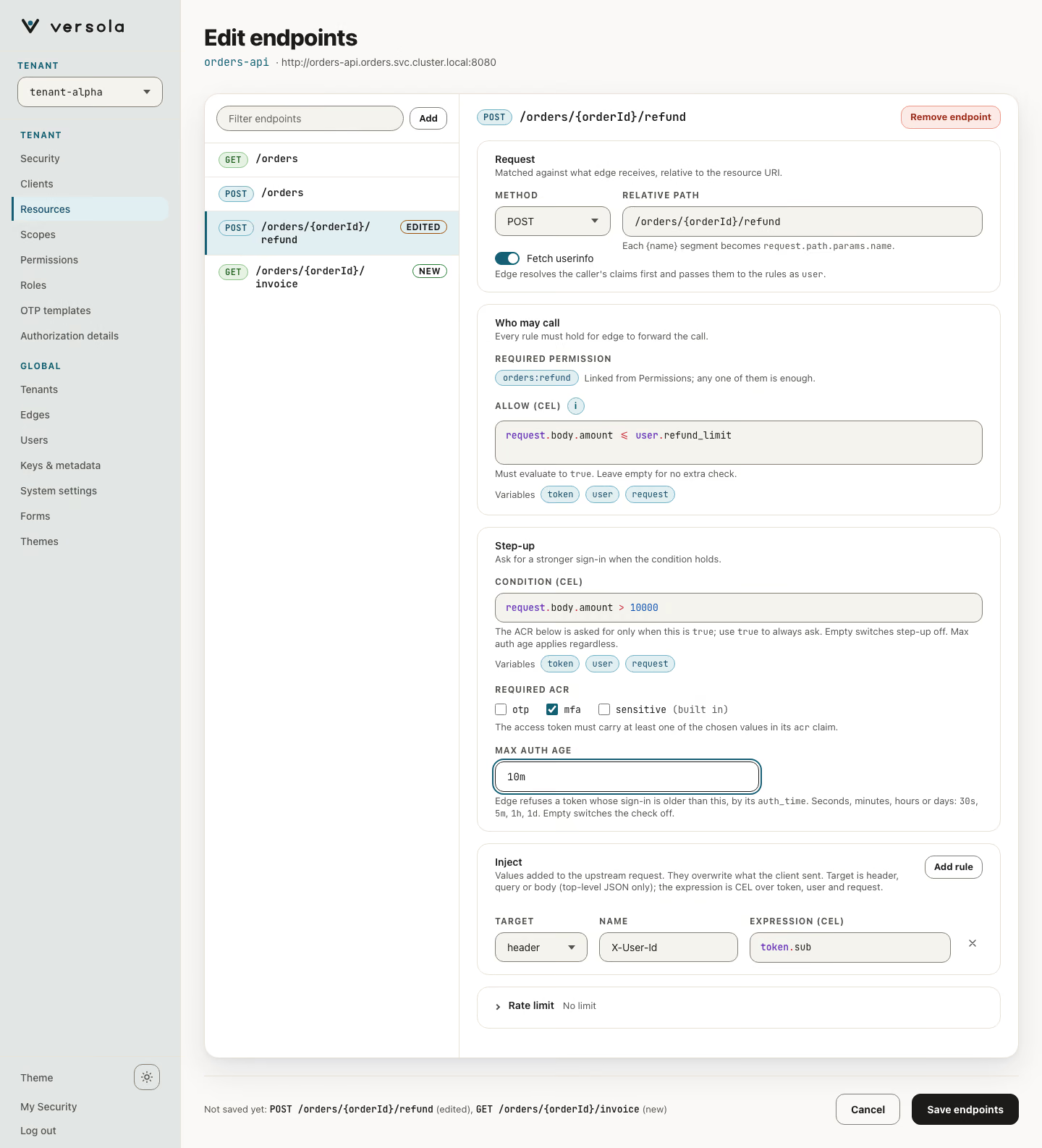
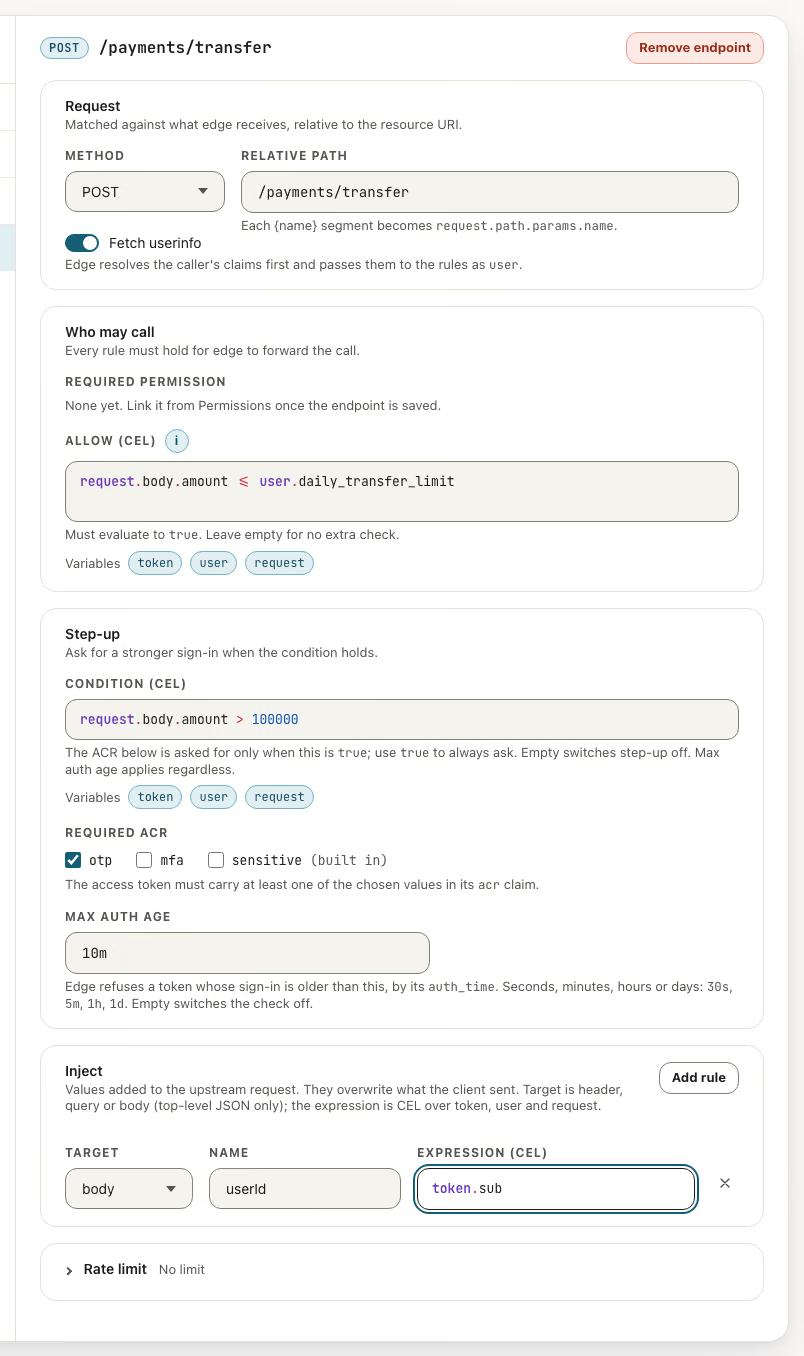
Edit endpoints opens a page with the endpoints in a list on the left and the selected one on the right. The list marks what is not saved yet (New, Edited) and which rules each endpoint carries (Allow, Step-up, Inject); Add appends an endpoint and the filter finds one by text, /path or METHOD /path. The right side has five panels, in the order the table reads, with the folded Rate limit last:
| Panel | Fields |
|---|---|
| Request | Method, Relative path, Fetch userinfo: load the user’s claims from auth and expose them to CEL as user. Costs one extra call per request |
| Who may call | Required permission, read-only (it lists the permissions that cover the endpoint), and Allow (CEL): a boolean expression that must return true. Empty means no extra check |
| Step-up | Condition (CEL): when it returns true, the caller must hold one of the Required ACR values; empty means no step-up. Required ACR: the values registered under Step-up (ACR) on Security. Max auth age (seconds): refuse the call if the user authenticated longer ago; empty means no limit, and it applies whether or not the condition holds |
| Inject | Add rule: each rule writes a computed value into an upstream header, query parameter or top-level JSON body field. A rule has a Target, a Name and an Expression (CEL) |
| Rate limit | Folded, because it is rarely changed: the title shows what is set (No limit, or Enforce · 30 / 60 s · each user · burst 5). Set a limit adds one on how often the endpoint is called: Mode, Count by (The endpoint as a whole, Each client or Each user), the windows and the Burst. The edge applies it with its own rate limit policies and the smaller limit wins. The table tags an endpoint that has one with limit: and its summary |
Nothing is sent until Save endpoints. The bar under the list names what changes (Not saved yet: GET /orders (new), POST /orders/{orderId}/refund (edited)). Saving sends the removed endpoints and the new and edited ones in one request; an edited endpoint keeps its identity, so the permissions that cover it stay linked. Removing an endpoint that permissions cover asks first and names them.
The expressions, the variables they read, the order of evaluation and the status code for each failure are on Endpoint policies. Expressions are validated as you type and again when you save; a syntax error blocks the save, and so does a path that breaks the rules above.
An endpoint answers 403 to everyone until some permission covers it and the caller holds that permission.
The secret of an internal resource
Versola generates the secret when you create an internal resource and shows it once, in a banner on the new resource’s page. It is stored encrypted and cannot be shown again. If you lose it, rotate it. Leaving the page before you press I’ve saved it asks first.
To rotate, press Rotate secret on the Secret card. The new secret is shown once. The previous secret stays in place, the title carries a Secret rotation chip, and a banner says A new secret was issued. edge keeps authenticating with the previous secret during rotation. Make the upstream accept both, then press Activate new secret (in the banner or on the card) and confirm. edge switches to the new secret after its next sync and the previous one is dropped. Only one rotation can be in progress at a time.
Creating and deleting
+ Create Resource opens one form with three groups: Basics (ID and URI), Type (two cards, Internal and Public) and Audience. Endpoints are added afterwards on the new resource’s page, where the permissions that cover them are visible. A resource with no endpoints is valid. Creating lands on the new resource’s page, with the secret banner when it is internal.
You can change the URI, the audience and the endpoints. Deleting a resource asks for confirmation; the dialog names the route that stops working and the permissions linked to its endpoints, which keep them as detached endpoints.
Next steps
- How to register a resource: the form, step by step.
- Endpoint policies: CEL variables, inject, step-up and failure codes.
- Permission: make the endpoints reachable.