When an edge is asked for more than it can serve, it is better to refuse the surplus at once than to queue it until every request is slow. Overload protection does that, and it is configured per edge from central, so you can change it without redeploying. You need an edge that is already registered and an operator with edges:manage; edges:read shows the settings and nothing more.
What it protects
Two guards, each with its own mode and its own settings:
| Guard | Where | What it limits |
|---|---|---|
| Inbound admission | edge | Requests in flight at the edge. Above the limit a request is refused with 503 and a Retry-After header. |
| Outbound calls | every service, per peer | Calls the edge makes to auth and to your resource backends: calls in flight, a bounded wait, a request timeout, a circuit breaker and a retry budget. A refusal is 503, a call that took too long is 504. |
central is never limited by the outbound guard, so a service can still wait for its configuration at start-up, and nothing is enforced until the service has started.
The three modes
| Mode | What happens |
|---|---|
off | Nothing is counted, nothing is learned, nothing is refused. |
shadow | The edge counts what enforce would refuse and refuses nothing. This is the default, so an upgrade changes nothing until you choose otherwise. |
enforce | The edge refuses what is above the limit. |
Priorities
Inbound admission does not treat requests alike. A request is admitted while the requests in flight are below its tier’s share of the limit, so the top of the limit stays free for work that matters more:
- New login (the most expensive, work not yet started): refused first. It may use the start share of the limit, default 0.65.
- Work already begun (code exchange, logout): refused next. It may use the continuation share, default 0.85.
- Proxied calls to your API: refused last. They may use the whole limit.
- Health and metrics, configuration sync and back-channel logout: never counted and never refused.
What the numbers mean
The limit is not a number someone guessed. The edge learns it from how long calls take and from how late its own executor runs a timer: it shrinks when calls slow down or the executor stalls, and grows back while calls are fast, between a lowest and a highest limit. It is learned whenever the inbound mode is not off; in shadow it is learned and nothing is refused. The starting limit is only where it begins (clamped into the bounds).
Every field is optional. A field left empty is not sent, and the edge uses its own deployment’s value: the HTTP_ADMISSION_* or HTTP_CLIENT_GUARD_* environment variable when the edge sets one, otherwise the built-in default. Setting one field does not pin the rest.
Inbound
| Field | Default | Environment base | Meaning |
|---|---|---|---|
mode | shadow | HTTP_ADMISSION_MODE | off, shadow or enforce. |
maxInFlight (Starting limit) | 256 | HTTP_ADMISSION_MAX_IN_FLIGHT | Where the learned limit starts, 1 to 100000. |
continuationShare | 0.85 | HTTP_ADMISSION_CONTINUATION_SHARE | Share of the limit work already begun may use, 0.01 to 1. |
startShare | 0.65 | HTTP_ADMISSION_START_SHARE | Share a new login may use, 0.01 to 1, not above continuationShare. |
retryAfterSeconds | 1 | HTTP_ADMISSION_RETRY_AFTER | The Retry-After of a refusal, 1 to 60 s. |
adaptive.minLimit | 16 | none | The learned limit never goes below this, 1 to 100000. |
adaptive.maxLimit | 1024 | none | The learned limit never goes above this, 1 to 100000, not below minLimit. |
adaptive.tolerance | 1.5 | none | How much slower than usual a call may get before the limit shrinks, 1 to 5. |
adaptive.smoothing | 0.2 | none | Share of each new estimate that replaces the limit, 0.01 to 1. |
adaptive.lagTargetMillis | 50 | none | How late the executor may run a timer before it counts as stalled, 5 to 10000 ms. |
A starting limit below minLimit or above maxLimit starts at the nearest bound.
Outbound
| Field | Default | Environment base | Meaning |
|---|---|---|---|
mode | shadow | HTTP_CLIENT_GUARD_MODE | off, shadow or enforce. |
maxConcurrent | connection pool size (128) | HTTP_CLIENT_GUARD_MAX_CONCURRENT | Calls in flight towards one peer, 1 to 100000. |
maxQueue | 256 | HTTP_CLIENT_GUARD_MAX_QUEUE | Calls allowed to wait for a place; one more is rejected at once, 1 to 100000. |
queueTimeoutMillis | 1000 | HTTP_CLIENT_GUARD_QUEUE_TIMEOUT | The longest a call waits for a place, 1 to 600000 ms. |
requestTimeoutMillis | 10000 | HTTP_CLIENT_GUARD_REQUEST_TIMEOUT | The longest a call may take to the response headers, 1 to 600000 ms. |
breaker.enabled | off | none | The circuit breaker is off unless set. |
breaker.failureRatio | 0.5 | none | Share of failed calls (a transport error, a timeout, 502, 503, 504) that opens the circuit, 0.01 to 1. |
breaker.minCalls | 20 | none | Calls the window must hold before the ratio counts, 1 to 10000. |
breaker.windowSeconds | 10 | none | The period the ratio is measured over, 1 to 300 s. |
breaker.openSeconds | 5 | none | How long the circuit refuses at once before probing, 1 to 600 s. |
breaker.probeCalls | 3 | none | Calls let through to test a half-open circuit, 1 to 100. |
retryBudget.ratio | 0.1 | none | Retries allowed per call made, 0 to 1. |
retryBudget.minPerSecond | 5 | none | Retries always allowed, whatever the ratio, 0 to 1000. |
Queueing and timeouts apply in enforce only.
Set it in the console
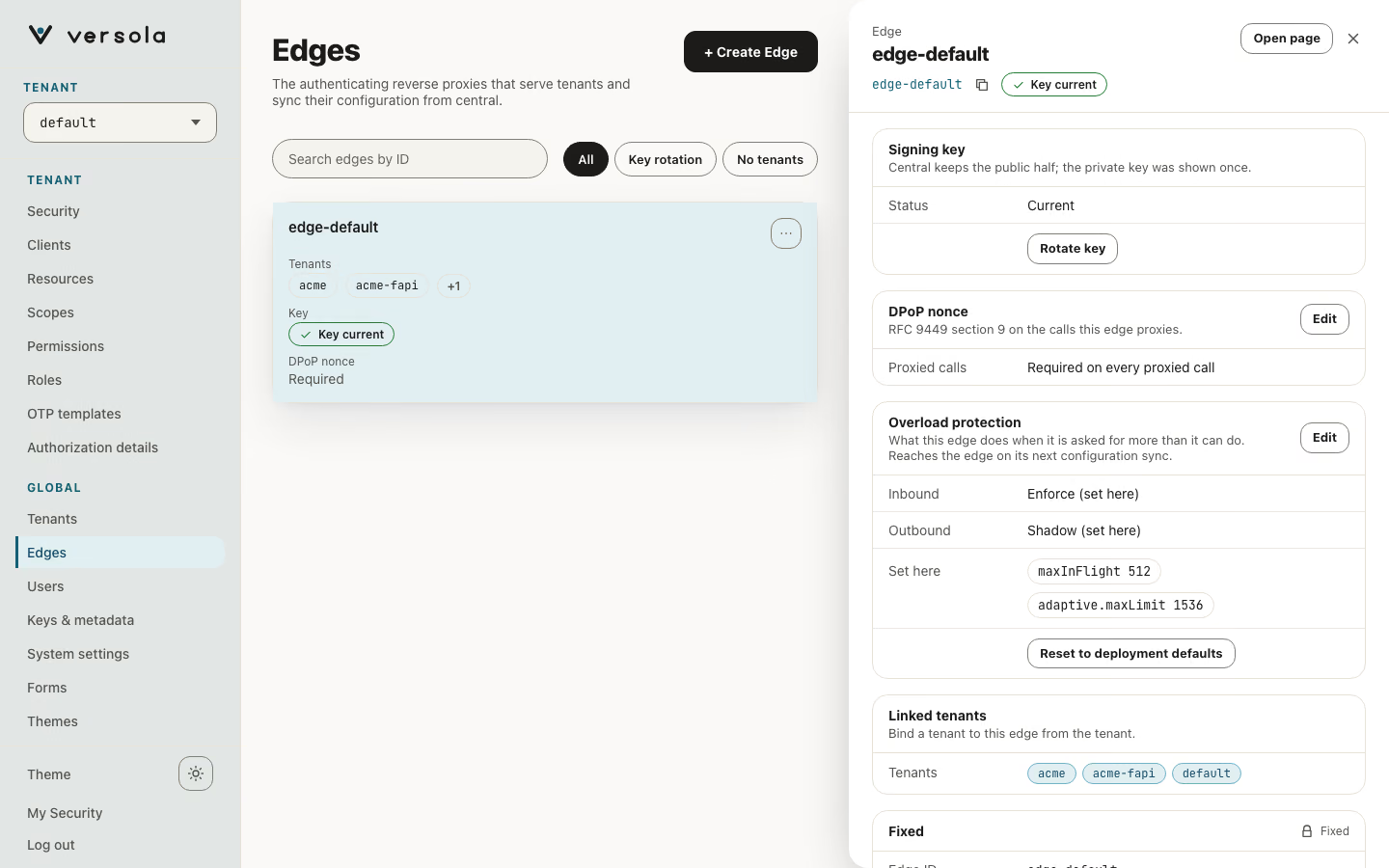
Open Edges, open the edge, and use Edit on the Overload protection card. The editor opens in the side panel: an inbound section and an outbound section, each with a short note on how to tune it, the mode as a choice of Deployment default, Off, Shadow and Enforce, and every other field with the default (and its environment variable) written under it. The rarely changed tolerance, smoothing and lag target sit under Advanced.
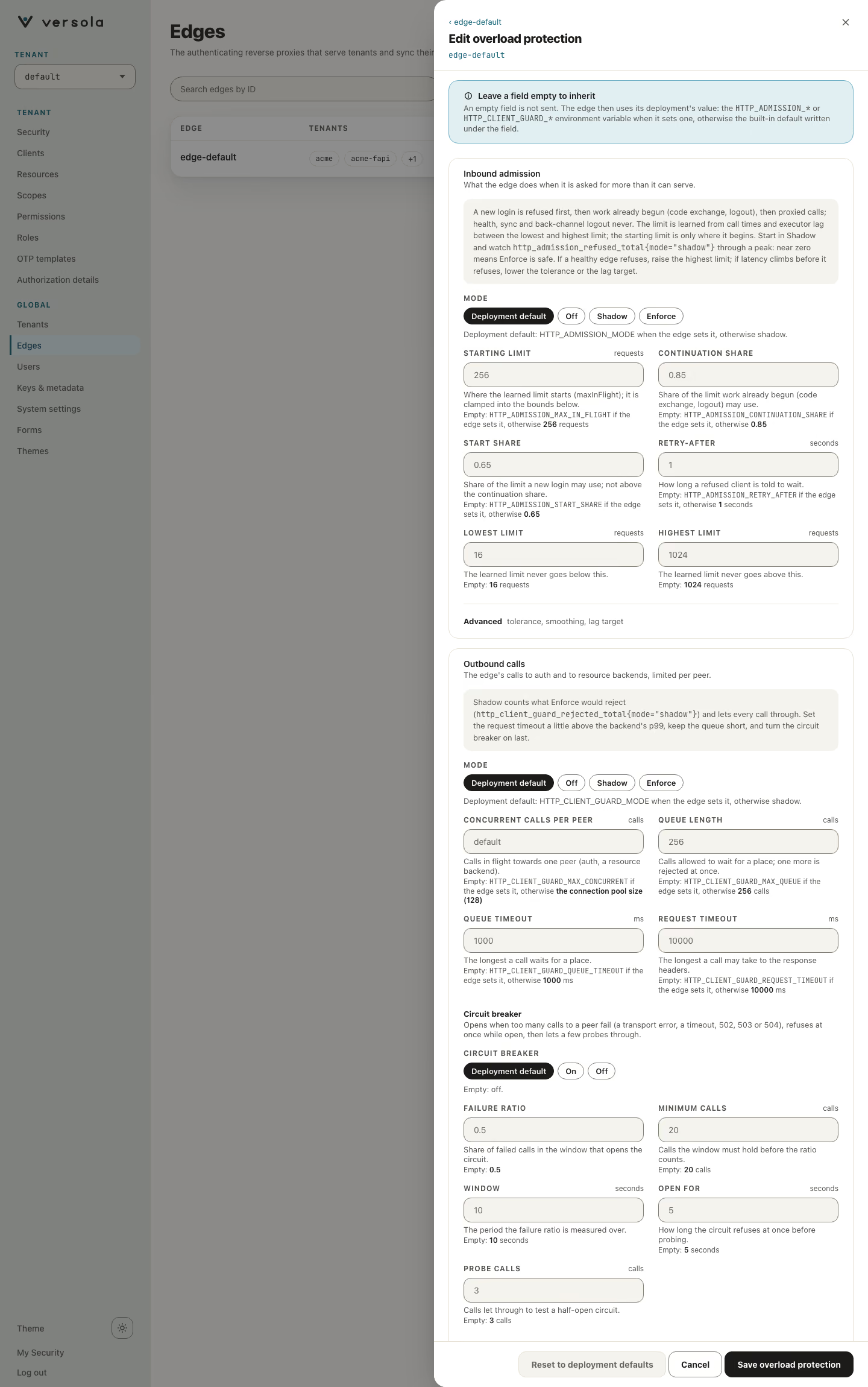
The editor checks the ranges as you type, with the same messages central uses, and does not send a policy that fails them. Save overload protection sends only the fields you filled in. Reset to deployment defaults removes the policy after a confirmation, and the edge goes back to its own deployment’s values.
A change reaches the edge on its next configuration sync, inside the refresh interval (5 minutes by default). While central is unreachable the edge keeps the last policy it received. A policy that fails validation is refused by central and not applied by an edge.
Set it by API
PATCH /configuration/edges/policies?edgeId=<id> with an overload section replaces the policy as a whole; "overload": null removes it, and the other sections of the edge (accessLog, rateLimits) are left as they are. The section is the OverloadPolicy schema in the central OpenAPI file. Fields the schema does not know are ignored. expectedRevisions and dryRun are described on Rate limits.
{
  "overload": {
    "inbound": {
      "mode": "enforce",
      "adaptive": { "maxLimit": 1536 }
    },
    "outbound": { "mode": "shadow" }
  }
}
A value outside its range answers 400 with no body; the first problem found is in central’s log.
Roll it out
- Leave
shadow, the default, for at least a day of real traffic that includes a peak. - Read
http_admission_refused_total{mode="shadow"}. Near zero while the edge has capacity means the limit is not in the way. Many shadow refusals at the peak meanenforcewould shed that traffic: raiseadaptive.maxLimitor add capacity first. - Set the inbound
modetoenforceon one edge. Watch refusals, throughput and latency through a peak, then do the others. - Do the outbound guard one step later in the same way, and turn the circuit breaker on last.
What a client sees in enforce: 503 with Retry-After: <retryAfterSeconds>. A client should wait at least that long, add jitter, and retry a bounded number of times; an immediate retry loop makes the overload worse.
Read the metrics
| Metric | What it tells you |
|---|---|
http_admission_refused_total{tier,mode} | Refusals by tier; in shadow, what enforce would have refused. |
http_admission_in_flight, http_admission_in_flight_peak | Requests in flight now, and the highest value since the previous sample. |
http_admission_limit | The learned limit in force. |
http_admission_adaptive_limit_ratio | The learned limit over maxLimit; near 1 means room, low means the edge is squeezed. |
http_admission_rtt_seconds{tier} | Mean call time of the last window, by tier. |
http_executor_lag_seconds | The worst lateness of a 10 ms timer in the last second. |
http_client_guard_rejected_total{mode} | Outbound rejections; in shadow, what enforce would have rejected. |
http_client_guard_in_flight, _waiting, _breaker_state | Outbound calls in flight, waiting, and the circuit state. |
Tune it
| Symptom | Change |
|---|---|
Refusals in enforce while the pod is idle | Raise adaptive.minLimit, or adaptive.maxLimit if http_admission_limit sits at it. |
| Latency climbs before the edge refuses anything | Lower adaptive.tolerance (nearer 1) or adaptive.lagTargetMillis. |
| The limit swings up and down | Lower adaptive.smoothing. |
| New logins are refused while proxied calls are fine | This is the intended order. Raise startShare only if logins matter more than proxied calls. |
| Clients retry in a tight loop after a refusal | Raise retryAfterSeconds. |
| Calls to a slow backend pile up | Lower outbound maxConcurrent, and set requestTimeoutMillis slightly above the backend’s p99. |
| A failing backend keeps receiving calls | Turn the circuit breaker on, and tune failureRatio and openSeconds. |
Next steps
- Rate limits — refusing a caller that sends more than its share, with
429 - Observability — the metrics endpoint and what else to alert on
- Edges — the screen this page adds a card to
- Edge configuration — the environment of an edge