A theme decides how every sign-in screen looks: colours, corners, the page behind the card. The Themes screen lists the themes, builds a new one from a built-in base theme, a few values and, if you want, token overrides and your own CSS, and previews it on the real forms before you save.
Before you start
Themes sits under GLOBAL in the sidebar, after Forms. Themes can be global or belong to one tenant, so the list follows the tenant selected in the sidebar. You need forms:read to see the screen, and forms:manage to create, edit or delete a theme. A client selects its theme in Forms Theme on its page (Client); a client that selects none gets the default theme.
The list
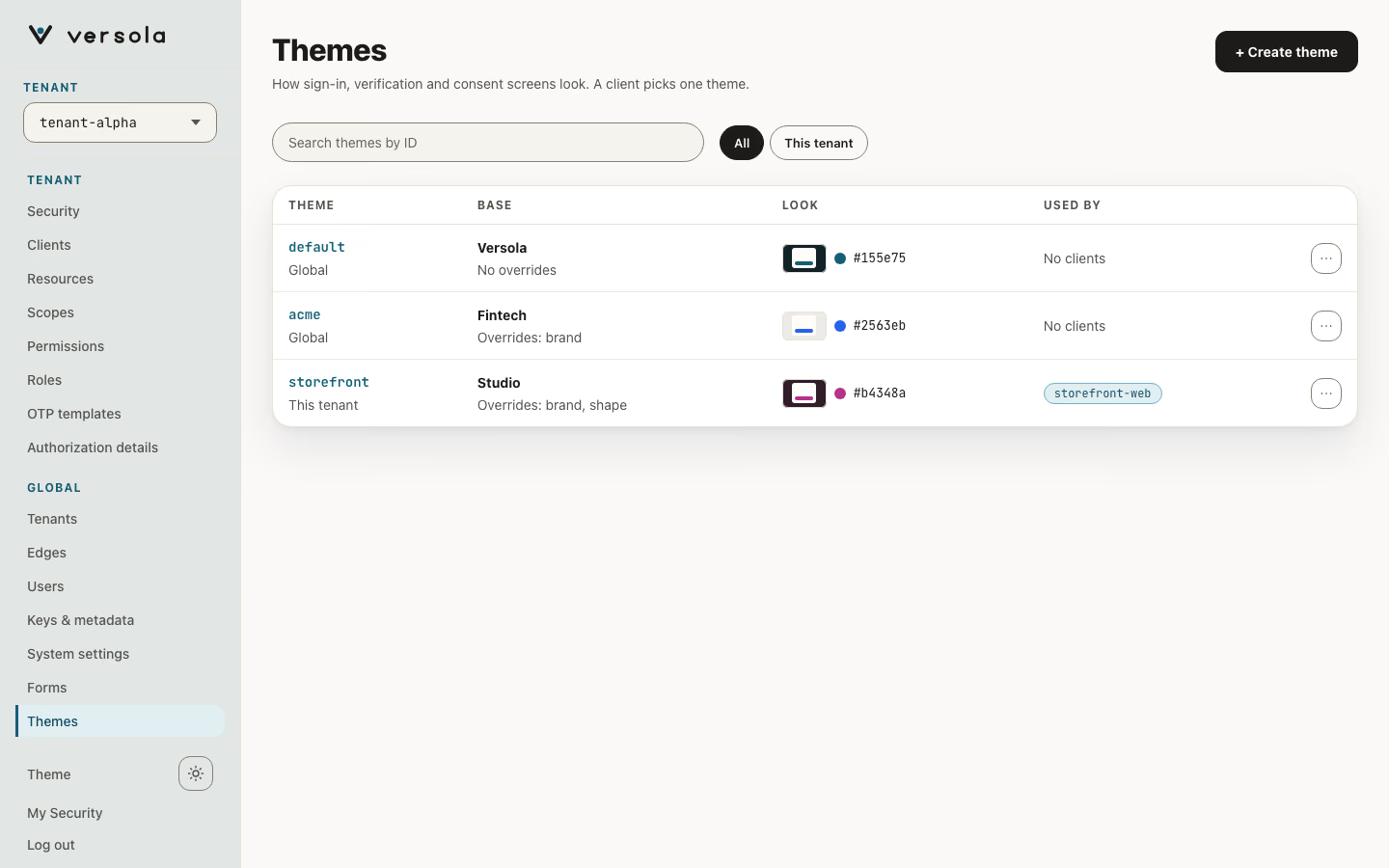
A theme is a base theme, a few values over it and, optionally, your own CSS. One table lists the global themes and those of the selected tenant, and says which is which.
| Column | Meaning |
|---|---|
| Theme | The theme ID, with Global or This tenant under it. |
| Base | The base theme and the values it overrides by name, then Token overrides and Custom CSS when the theme has them: Versola · Overrides: brand, shape · Token overrides · Custom CSS, or No overrides. A theme stored with CSS only (before themes had values) reads Versola + custom CSS. |
| Look | A thumbnail of the page, the sheet and the brand, and the hex of the brand colour (the theme’s own override, else its base’s). A theme stored with CSS only says Set by its CSS. |
| Used by | The first two clients that name the theme, and +N for the rest (named on hover); No clients when none does. A client that names no theme uses default. |
“Used by” is worked out in the console from the clients of the selected tenant. central has no usage endpoint, so a global theme can also be used by a client of another tenant, which the list does not show; central still refuses to delete such a theme.
The filters are All and This tenant, next to a search by theme ID. The row menu has Open, Copy ID and Delete theme, which is disabled, with its reason, while the theme cannot be deleted. + Create theme opens the editor.
A theme’s page
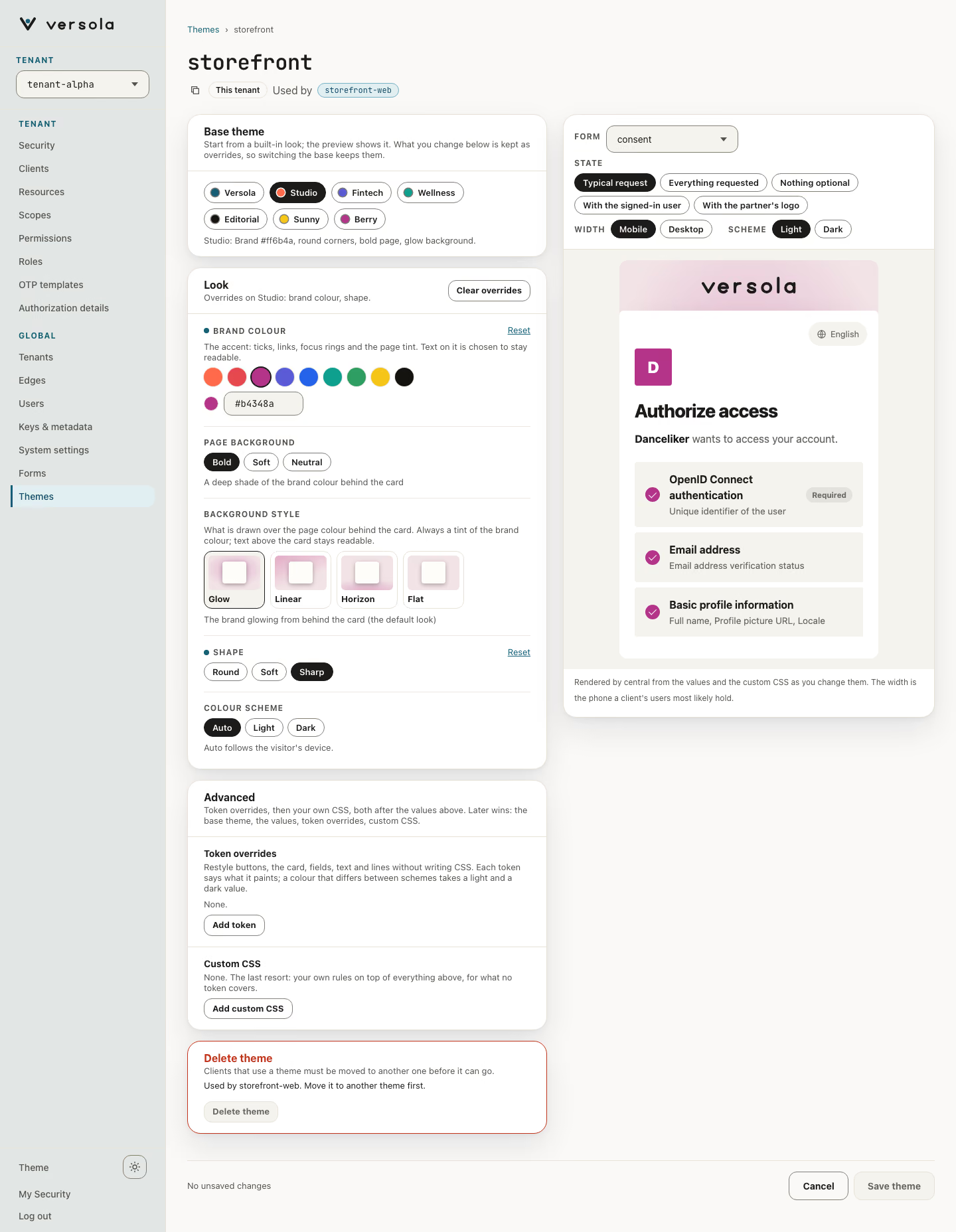
Click a row to open the theme. The page is the editor: its header has the theme ID, the scope, Token overrides and Custom CSS tags when the theme has them, and the clients that use it. It has no primary button in the header; a bar sticks to the bottom of the page with Cancel and Save theme and says what is not saved yet, for example Unsaved: brand colour, shape. Save theme stays disabled until something changes, and saving keeps you on the page. Leaving with unsaved changes asks for confirmation.
The preview of the sign-in form sits to the right of the controls, stays on screen while they scroll, and is 560 px wide on a wide window and 380 px on a narrower one; below 900 px it is a collapsible band above the controls.
| Field | Meaning |
|---|---|
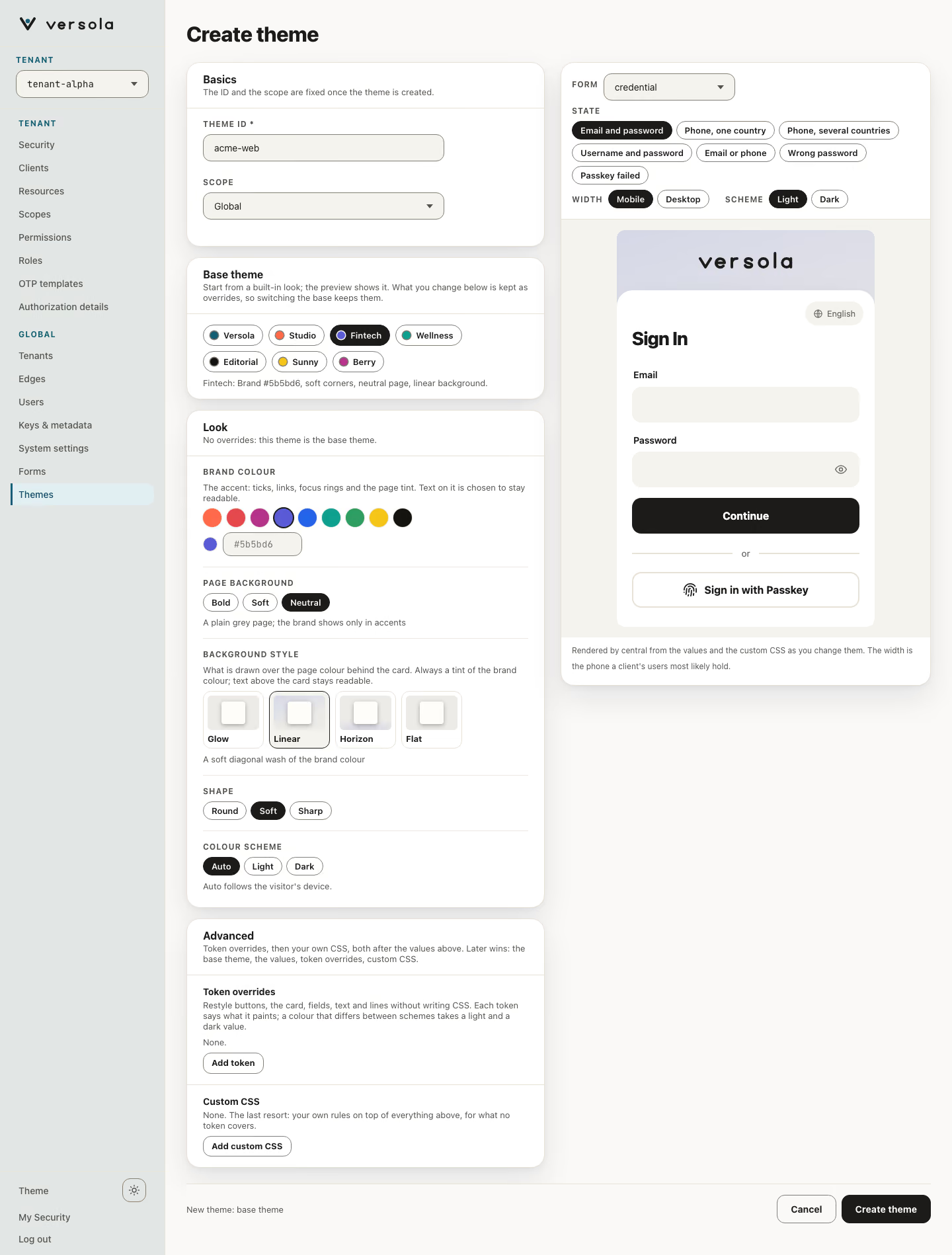
| Theme ID | The name clients select, for example acme-dark. Fixed after creation. |
| Scope | Global (every tenant) or This tenant (the tenant selected in the sidebar). Chosen when you create the theme. |
Delete theme is the last card. It is disabled, with the reason, for a theme that clients use (Used by shop-mobile and storefront-web. Move them to another theme first.) and for default, which cannot be deleted. Otherwise a confirmation names the theme. If a client of another tenant still uses it, the API answers with a conflict and the page shows the message. default is a theme like any other: it starts on the Versola base with no overrides, and you edit it in the same editor, so a change to it reaches every client that uses it. It is created that way on an empty database; on upgrade, central converts a default that was still the bundled stylesheet into that visual theme, and leaves a default that already has a base and overrides as you set it.
Create a theme
+ Create theme opens the editor with a Basics card (Theme ID, Scope) above the Base theme, Look and Advanced cards. Create theme stores it and opens its page.
Base theme and values
A theme is one of the built-in base themes and the values you override on it.
| Base theme | Brand colour | Shape | Page background | Background style |
|---|---|---|---|---|
| Versola | #155e75 | Soft | Bold | Glow |
| Studio | #ff6b4a | Round | Bold | Glow |
| Fintech | #5b5bd6 | Soft | Neutral | Linear |
| Wellness | #0e9f8e | Round | Soft | Horizon |
| Editorial | #14130f | Sharp | Neutral | Flat |
| Sunny | #f5c518 | Soft | Bold | Glow |
| Berry | #b4348a | Round | Bold | Glow |
The list is part of the central build; you cannot add to it or change it. Over a base you can set five values:
| Value | Choices | Meaning |
|---|---|---|
| Brand colour | Any #rrggbb | The accent: ticks, the underline of links, the focus ring and the tint of the page. The text on it is white or near-black, whichever has the better contrast. Nothing but #rrggbb is accepted, because the value is written into a stylesheet. |
| Page background | Bold, Soft, Neutral | Bold colours the page with the brand: a deep shade of it in the dark scheme and a light page lightly tinted with it in the light one. Soft is a pale tint of it, Neutral a plain grey. |
| Background style | Glow, Linear, Horizon, Flat | What is drawn over the page colour behind the card, shown as small preview cards in your brand colour. Glow is the brand glowing from behind the card in both colour schemes, and is the look every theme had before this value existed. Linear is a soft diagonal wash, Horizon a light rising from the bottom edge, Flat the plain page colour. Every style is a tint of the brand colour only, and its strength follows the page background and the colour scheme so that the brand above the card stays readable. |
| Shape | Round, Soft, Sharp | The corners of fields, buttons and the card. |
| Colour scheme | Auto, Light, Dark | Auto follows the visitor’s device and shows the visitor a colour scheme toggle on the sign-in forms. Light and Dark fix the scheme for everyone and hide the toggle. |
The Base theme card is a row of pills, one per base theme, each with its brand colour as a dot and a line under the row saying what the selected one sets. In the Look card, a value that differs from the base is marked Overridden with the base’s value, and Reset puts it back; Clear overrides in the card’s header resets them all, and the card’s subtitle names the overridden values (Overrides on Versola: brand colour, shape.). Choosing a value equal to the base’s is not an override, so the theme then follows the base. Switching the base keeps the overrides. Single variables and your own rules go in the Advanced card, described below; leave it empty unless a value cannot do what you need.
auth builds the stylesheet of a theme when it serves a form: the base stylesheet that ships with Versola, then what the values set, then the token overrides, then the theme’s custom CSS. The base stylesheet is part of the release, not a theme you can edit; to change the look of every screen, edit the default theme’s values or give it custom CSS.
The preview renders a form you choose (the active version of any form), in the state you choose, in the light or dark scheme and, on a wide window, at phone or desktop width, with the same stylesheet auth would serve, custom CSS included. It starts in the scheme of your device. The dark preview is not available when the theme fixes its colour scheme. If central cannot render the preview, the page says so and keeps the last version that rendered, dimmed.
Note: With a
centralthat lists no base themes, Create theme stays disabled: a theme is always built on a base.
A client’s own appearance
A partner app can override the same five values on top of the theme it uses, for its own sign-in screens only. It is set on the client page, under Forms Theme, and applies after the theme’s stylesheet; see Client. The theme itself is not changed, so the other clients that use it look the same.
What the screens look like
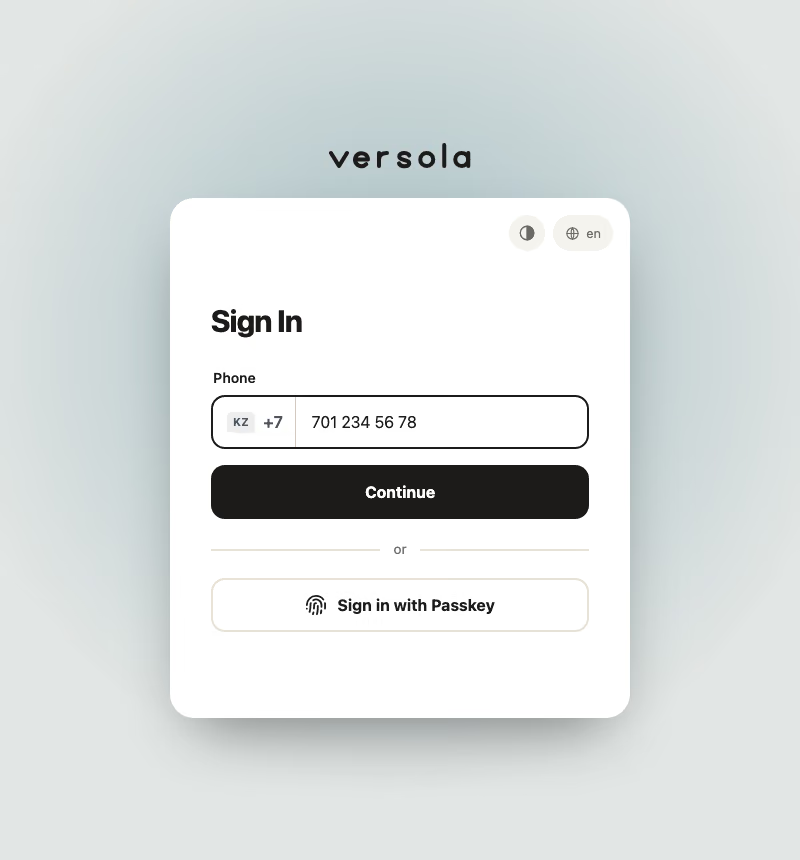
This is what a theme styles. The brand above the card is the tenant’s logo from Branding or, when there is none, the Versola wordmark; the partner’s icon is always inside the card.
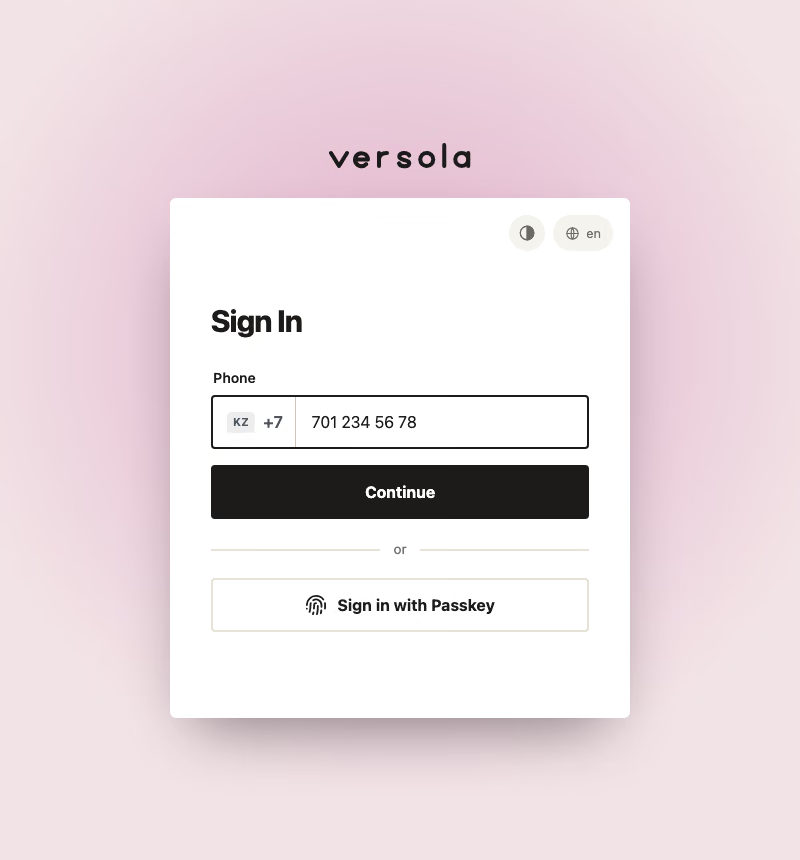
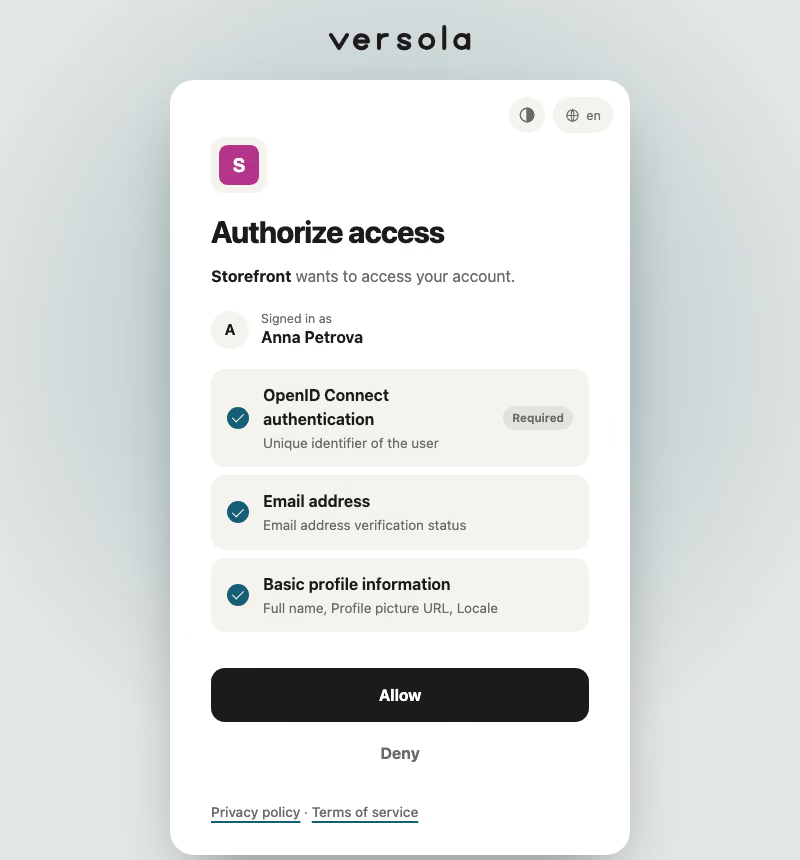
The visitor’s colour scheme toggle
With Auto, the forms that offer a language switcher also show a small icon button next to it: Auto, Light or Dark. The choice is made per browser and kept in the browser’s local storage for the sign-in origin. It is not an account setting, so it does not follow a user to another browser. The preview in the console does not show the toggle; use its own light and dark switch.
A fixed Light or Dark scheme, set on a theme or as a client override, hides the toggle, and a scheme the visitor chose earlier is not applied. A client that overrides a fixed theme with Auto shows the toggle again.
Advanced: token overrides and custom CSS
The Advanced card comes after Look. It has two parts, and both are applied after the values above. Later wins, so the order is: the base theme, the five values, the token overrides, the custom CSS.
Token overrides
A token override sets one named variable of the sign-in screens without any CSS. Press Add token, pick a token in the row and set its value. The list is grouped (Page, Brand and logo, Card, Text, Fields, Buttons, Links and focus, Lines, Status and overlays), and under it the row says in one line what the token paints and what it is by default: --btn is the fill of the main button and defaults to var(--ink). Remove takes a row away, and the bar names the change (Unsaved: token overrides). A token can be used once.
What you edit depends on the kind of the token:
| Kind | Control | Accepted |
|---|---|---|
| colour | A colour picker and a hex field | Hex (#rgb, #rrggbb, #rrggbbaa), a colour name, or rgb(), hsl(), oklch(), color-mix() and similar; var(--name) inside them. |
| length | A number in px | A number with px, rem, em, vw, vh or %, or 0. Not negative. |
| shadow | A text field | none, or one to four layers written [inset] x y [blur [spread]] colour. |
| weight | A text field | A whole number from 100 to 900. |
| font | A text field | Font names separated by commas, without quotes: fonts installed on the visitor’s device, no web fonts. |
A value the controls cannot show, such as color-mix(in oklab, red 10%, white) stored through the API, is a plain text field.
A colour that differs between the light and the dark scheme is a pair token (the Light and dark column below). It shows a Light and a Dark field, each with a picker and a hex, filled with what the forms paint now, so adding it changes nothing until you edit a value. Tick Same for both to write one value for both schemes; clear it to give each scheme its own, starting from that value. central writes a pair as light-dark(light, dark) and a single value as it is. A token that is not a pair takes one value only.
central refuses a name that is not in the reference below and a value that does not fit the token’s kind or is longer than 120 characters or contains ;, {, }, !, @, \, a comment, url( or expression(. The editor shows the reason under the row and keeps Save theme disabled; through the API the answer is 400 with the reason and nothing is stored. Overriding --brand does not move --on-brand or the focus colour: set those too when the contrast needs it. --btn, --link and --field-focus default to var(--ink), so overriding --ink moves them too unless you set them.
Tokens you can override
The list is defined in central and served by GET /configuration/themes/variables; the console reads it from there. The defaults are what the base stylesheet declares.
Page
| Token | Kind | Light and dark | Default | What it paints |
|---|---|---|---|---|
--page-light | colour | — | color-mix(in oklab, var(--brand) 9%, #f6f4ef) | Page colour in the light scheme |
--page-dark | colour | — | color-mix(in oklab, var(--brand) 10%, #060707) | Page colour in the dark scheme |
--glow-light | colour | — | color-mix(in oklab, var(--brand) 30%, transparent) | Glow behind the card in the light scheme |
--glow-dark | colour | — | color-mix(in oklab, var(--brand) 55%, transparent) | Glow behind the card in the dark scheme |
Brand and logo
| Token | Kind | Light and dark | Default | What it paints |
|---|---|---|---|---|
--brand | colour | — | #155e75 | Accent colour; page tints and focus rings follow it |
--on-brand | colour | — | #ffffff | Text colour that reads on the accent colour |
--page-ink | colour | Yes | light-dark(#1c1b19, #f3f2f0) | Colour of the logo and wordmark above the card |
--logo-plate | colour | Yes | light-dark(var(--field), rgba(255, 255, 255, 0.94)) | Plate behind a partner’s logo in the app badge and on the consent screen, so a dark logo stays visible |
--logo-h | length | — | 40px | Height of your logo above the card |
Card
| Token | Kind | Light and dark | Default | What it paints |
|---|---|---|---|---|
--sheet | colour | Yes | light-dark(#ffffff, color-mix(in oklab, var(--brand) 7%, #1f1f20)) | Surface of the card |
--sheet-line | colour | Yes | light-dark(transparent, rgba(255, 255, 255, 0.09)) | Border of the card (invisible in the light scheme by default) |
--rs | length | — | 24px | Corner radius of the card |
--shadow | shadow | — | 0 30px 60px -24px var(--shadow-color) | Shadow under the card; none removes it |
--shadow-color | colour | Yes | light-dark(rgba(0, 0, 0, 0.45), rgba(0, 0, 0, 0.8)) | Colour of the shadow under the card |
--card-w | length | — | 460px | Width of the card on a desktop; a phone uses the full width |
--card-pad | length | — | 40px | Side padding inside the card (at most 22px on a phone) |
Text
| Token | Kind | Light and dark | Default | What it paints |
|---|---|---|---|---|
--ink | colour | Yes | light-dark(#1c1b19, #f3f2f0) | Main text colour; links, the main button and the focused field’s border follow it unless set |
--text-muted | colour | Yes | light-dark(#6b6a66, #a9a9b0) | Secondary text: descriptions, hints and labels |
--invert | colour | Yes | light-dark(#ffffff, #1c1b19) | Text colour on the —ink fill, the opposite of —ink |
--heading-weight | weight | — | 750 | Weight of the page title, 100 to 900 |
--font | font | — | system-ui, -apple-system, BlinkMacSystemFont, Segoe UI, sans-serif | Font of all text: names of fonts installed on the device, no web fonts |
Fields
| Token | Kind | Light and dark | Default | What it paints |
|---|---|---|---|---|
--field | colour | Yes | light-dark(#f5f3ee, color-mix(in oklab, var(--brand) 9%, #2b2b2d)) | Fill of fields, code boxes and quiet rows |
--field-hover | colour | Yes | light-dark(#edeae3, color-mix(in oklab, var(--brand) 12%, #323235)) | Fill of a field under the pointer |
--field-focus | colour | Yes | var(--ink) | Border of the focused field and of the active code box |
--placeholder | colour | Yes | color-mix(in srgb, var(--text-muted) 70%, transparent) | Placeholder text in empty fields |
--rf | length | — | 14px | Corner radius of fields |
--control-h | length | — | 54px | Height of fields and buttons |
Buttons
| Token | Kind | Light and dark | Default | What it paints |
|---|---|---|---|---|
--btn | colour | Yes | var(--ink) | Fill of the main button |
--on-btn | colour | Yes | var(--invert) | Text colour on the main button |
--btn-hover | colour | Yes | color-mix(in srgb, var(--btn) 88%, var(--sheet)) | Fill of the main button under the pointer |
--btn-secondary-line | colour | Yes | var(--line) | Border of the secondary button |
--btn-secondary-ink | colour | Yes | var(--ink) | Text of the secondary button, and its border under the pointer |
--rb | length | — | 14px | Corner radius of buttons |
Links and focus
| Token | Kind | Light and dark | Default | What it paints |
|---|---|---|---|---|
--link | colour | Yes | var(--ink) | Colour of links |
--focus | colour | Yes | light-dark(var(--brand), color-mix(in oklab, var(--brand) 50%, white)) | Focus rings, ticks and the underline of links; keep it visible on the card |
--on-focus | colour | Yes | light-dark(var(--on-brand), #1c1b19) | Text colour on the focus colour, such as the tick in a checked box |
Lines
| Token | Kind | Light and dark | Default | What it paints |
|---|---|---|---|---|
--line | colour | Yes | light-dark(#e6e2d8, color-mix(in oklab, var(--brand) 10%, #38383b)) | Dividers, borders of rows, and the secondary button’s border |
--line-strong | colour | Yes | light-dark(#cfc9bb, #55535a) | Stronger lines: the border of a tick box and the divider in the country selector |
Status and overlays
| Token | Kind | Light and dark | Default | What it paints |
|---|---|---|---|---|
--danger | colour | Yes | light-dark(#c0341d, #ff8a73) | Colour of error text and of an invalid field’s border |
--scrim | colour | — | rgba(16, 24, 40, 0.45) | Dim layer behind dialogs and the phone’s country sheet |
Most restyling needs only these. Reach for custom CSS when no token does what you want.
Custom CSS
A theme that has no CSS shows this part collapsed, with an Add custom CSS button; a theme that has some opens with it expanded. It holds a CSS editor and, under it, the variables a rule may target. The hint says it plainly: Most things are tokens above: buttons, the card, fields, text, lines and the logo. Write CSS only for what no token does. It is applied after the colours, shape and background above, so your rules win; you are responsible for contrast and small screens. It is the last resort.
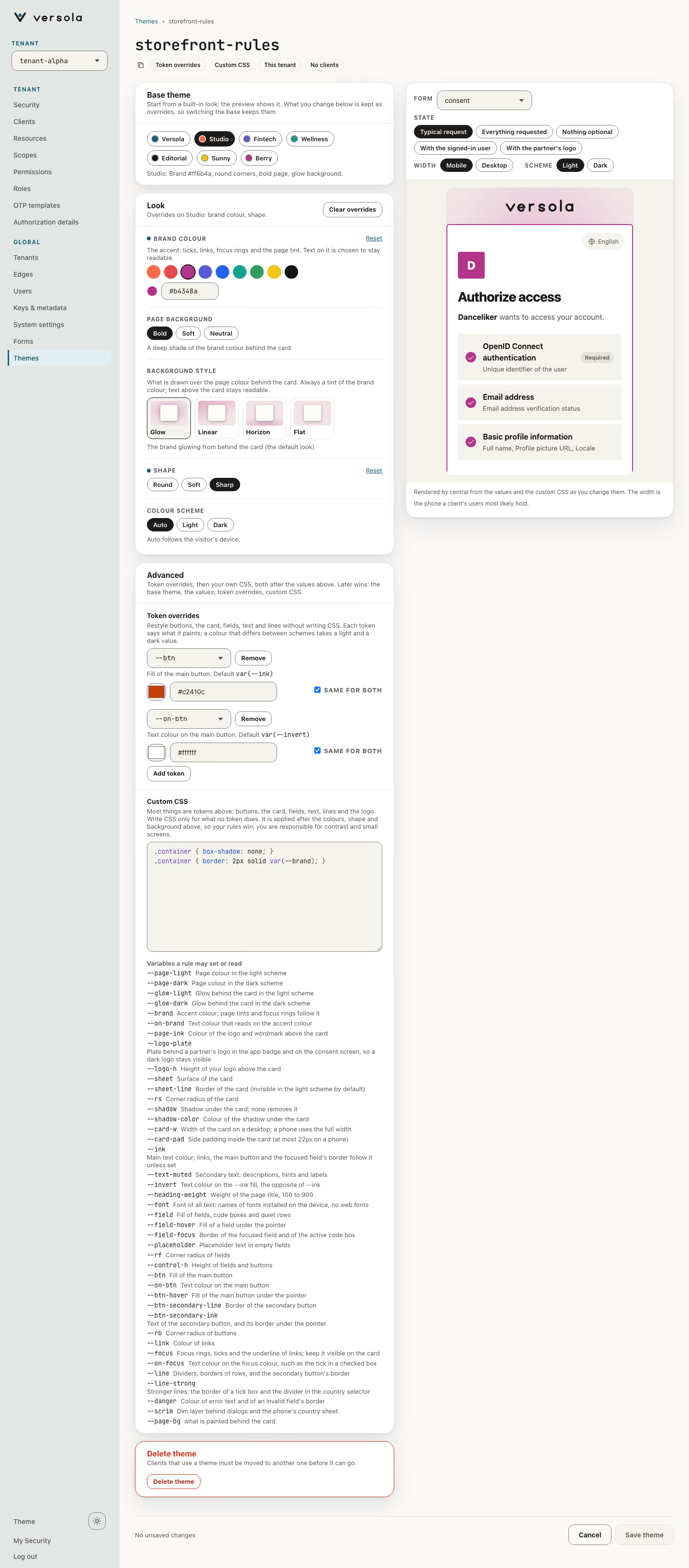
The rules are laid after the CSS generated from the values, so a rule wins over the value it targets: a :root { --rs: 8px; } beats the corner radius the Shape value gave (a token override does the same without CSS). The preview includes the CSS as you type, and the bar names it when it changed (Unsaved: custom CSS). The create page has the same card.
A rule may set or read the tokens above on :root, and these variables that are not tokens:
| Variable | Controls |
|---|---|
--page-bg | What the page paints behind the card: by default the glow over the page colour. The background style replaces only this variable. |
color-scheme | light or dark forces one scheme. By default the screens follow the visitor’s device. |
--scheme-locked | 1 hides the visitor’s colour scheme toggle. A theme with a fixed colour scheme sets it for you; the default is 0. |
Other selectors work too, for example .container { box-shadow: none; }, but class names are not a stable interface: a release may rename them, and a variable is the safer hook.
Note: Custom CSS is yours to maintain. Nothing checks it: a colour that reads badly on the card, or a width that overflows a phone, reaches your users as written. Check the preview in both colour schemes and at phone width. A theme that fixes
color-schemein its CSS and should not let visitors change it must also set--scheme-locked: 1.
A theme stored with CSS only
A theme stored before themes had values has CSS and no base. Until you save it, the forms that use it get that CSS alone, in place of the base stylesheet. The console opens it in the same editor, on the Versola base with no overrides, with the Custom CSS part of the Advanced card expanded and a line in the Base theme card saying so. Save theme is enabled at once: it stores the values the editor shows together with the CSS, and the CSS is then laid on top of them like any other custom CSS. Rules that assumed the old, whole stylesheet may need a second look, because the base stylesheet is now underneath them.