This guide puts one upstream API behind edge and lets a browser app call it with a session cookie. At the end a user can read their own orders, cannot read anyone else’s, and you have the curl commands that prove it. You need a running installation with a tenant linked to an edge, and your API reachable from edge over the network.
The example uses these names. Replace them with yours.
| Thing | Value |
|---|---|
Public address of edge (edge-url) | https://edge.example.com |
Public address of auth | https://id.example.com |
| Your browser app | https://app.example.com |
| Upstream API | http://orders.internal.example.com:8080 |
| Resource ID | orders-api |
| Client | acme-web |
| Permission, role | orders:read, customer |
| Preset | web |
Prerequisites
- An installation with
central,authandedge(Run Versola locally). - A tenant on the profile you want, linked to your edge in Tenants. See Security profiles.
centralhas a CA backend for client certificates, because a web client fronted byedgegets an issued certificate (Edge client certificates). The CLI targets configure one.- An upstream API with two routes:
GET /ordersandGET /users/{userId}/orders.
1. Register the resource
-
Open Resources and press + Create Resource.
-
Set Resource ID to
orders-apiand Absolute resource URI tohttp://orders.internal.example.com:8080. The URI has no path, query or fragment. -
Choose the type Internal.
edgethen calls your API with HTTP Basic credentials and never forwards the user’s token. -
Under Audience, tick the client
acme-webonce it exists (step 3). You can come back to this card. -
Press Create resource and copy the secret the banner shows. It appears once. Configure your API to accept Basic authentication with
orders-apias the user and that secret as the password. More detail is in How to register a resource. -
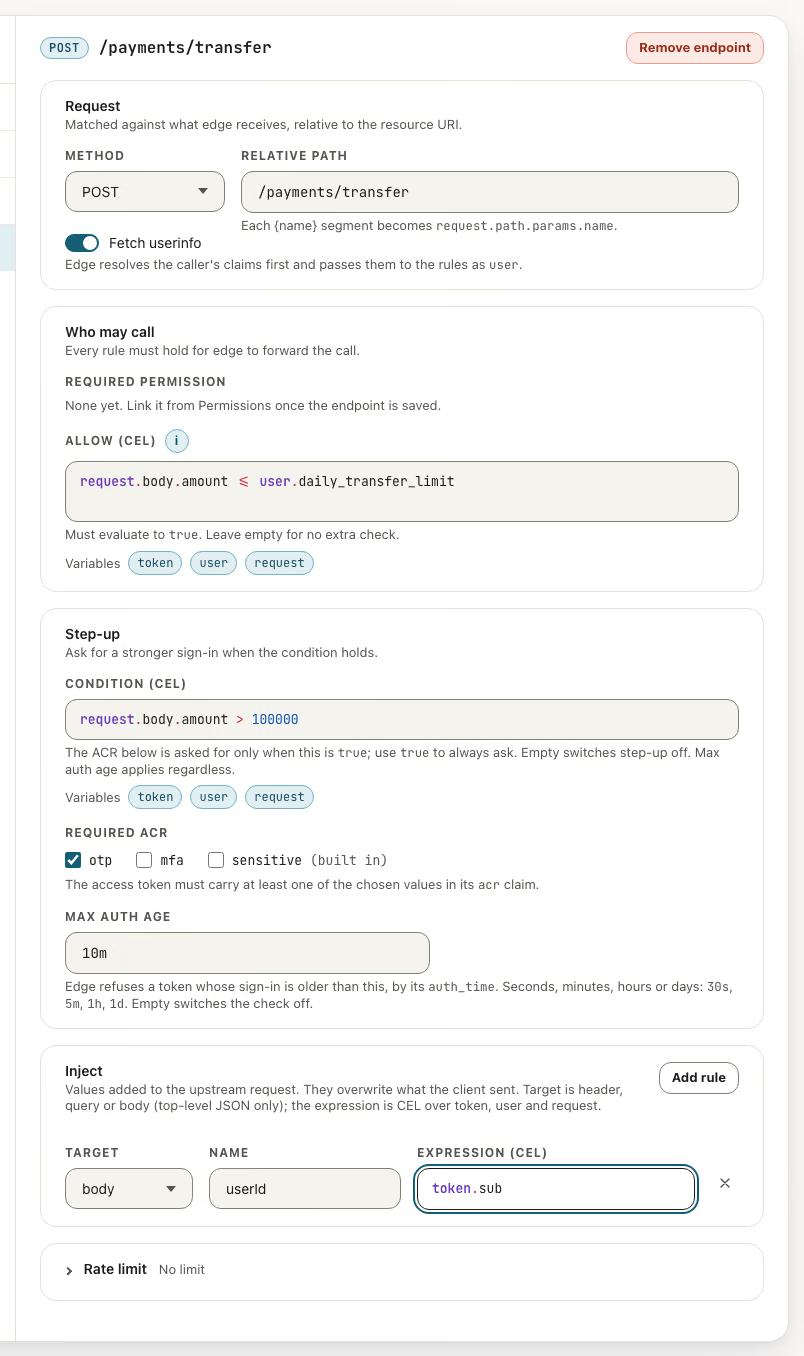
On the Endpoints card press Edit endpoints, then Add, and add
GET /orders. Leave the rules empty. -
Press Add again and add
GET /users/{userId}/orders. In Allow (CEL) enter:request.path.params.userId == token.sub -
Press Save endpoints.
The rule compares the userId in the URL with the sub claim of the caller’s token. Other fields and variables are on Endpoint policies.
2. Grant access through a permission and a role
An endpoint answers 403 until a permission covers it.
- Open Permissions, create
orders:readand attach both endpoints oforders-api(How to register a permission). - Open Roles, create
customerand addorders:read(How to register a role). - Open Users and give your test user the role
customer.
3. Create the client and the authorization preset
-
Open Clients and press the create button. In the wizard choose Web app and give the client ID
acme-web. -
Add the redirect URI
https://edge.example.com/complete. This is the/completeroute ofedge, which receives the code fromauth. -
Finish the wizard and go back to the Audience field of the resource to add
acme-webif you skipped it (How to register a client). -
On the client, open Authorization Presets and press + Add Preset:
Field Value Preset ID webRedirect URI https://edge.example.com/completeScopes openidResponse Type codePost-login redirect URI https://app.example.com/Post-logout redirect URI (optional) https://app.example.com/logged-outSession cookie domain, path (optional) leave empty for a cookie on the edgehost, path/ -
Press Save Presets.
edgeloads presets with the rest of its configuration, so allow up toconfiguration-cache-refresh-interval(generated: 5 minutes, 1 minute locally).
4. Point the browser app at edge
- Sign in. Send the browser to
https://edge.example.com/login/web. After sign-in it comes back tohttps://app.example.com/and holds anEDGE_SESSIONcookie that JavaScript cannot read. To require a recent login or a stronger one, addacr_valuesormax_ageto the URL. - Call the API. Request
https://edge.example.com/resources/orders-api/orderswithcredentials: 'include'. The part after/resources/orders-apiis matched against the endpoints you registered. - Same site, same origin. The cookie is
SameSite=Strict, so the app andedgemust be on the same site.edgesends no CORS headers, so serve the app andedgefrom one origin, for example by routing/resources/*and/login/*from your site’s proxy toedge. - Expired session. When the cookie cannot be refreshed,
edgeanswers401with aLocation: /login/webheader. Navigate there. - Sign out. Send the browser to
https://edge.example.com/logout/web.
5. Verify with curl
Sign in in the browser, then copy the EDGE_SESSION cookie value from the developer tools. It has the form web:<access token>. Take the user ID, the sub claim, from the token or from Users. A token bound to edge’s certificate works only from the cookie, so send it as a cookie and not as Authorization: Bearer.
Read your own orders:
curl -i -H "Cookie: EDGE_SESSION=web:<access token>" \
  https://edge.example.com/resources/orders-api/users/<your-user-id>/orders
HTTP/1.1 200 OK
...The body is whatever your API returns. Now ask for someone else’s orders:
curl -i -H "Cookie: EDGE_SESSION=web:<access token>" \
  https://edge.example.com/resources/orders-api/users/<another-user-id>/orders
HTTP/1.1 403 ForbiddenThe rule evaluated to false. edge logs access_rule_denied for this request and sends no body. The upstream never saw the call. Without a credential:
curl -i https://edge.example.com/resources/orders-api/ordersHTTP/1.1 401 UnauthorizedA path no endpoint matches, with a valid session, answers 404.
DPoP or certificate-bound tokens
The steps above serve a browser. When the caller is another system (a bank, a partner backend, a mobile app), it sends its own token in the Authorization header, and you choose how that token is bound to the caller. edge decides from the token’s cnf claim (Sender-constrained tokens).
DPoP (cnf.jkt) | Certificate-bound (cnf.x5t#S256) | |
|---|---|---|
| Caller proves | Possession of a key, with a signed proof on every request | Possession of a client certificate, in the TLS handshake |
| Port | The plain edge port | The mutual-TLS listener of edge, MPORT |
| Header | Authorization: DPoP plus DPoP | Authorization: Bearer |
| Key lives in | The application or the device keystore | A certificate issued by a CA, rotated by renewal |
| What the caller needs | A DPoP implementation, a nonce retry if required | An mTLS-capable HTTP client, and a plan for certificate renewal |
| What you run | Nothing extra. The dpop block of edge | A mutual-tls block with a server certificate, the caller’s CA in trusted-certificates, and a native block with edge-trusted-certificates on auth if endpoints use fetchUserInfo |
| Token after the caller renews | Unaffected as long as the key stays | The token names the old certificate. The caller gets a new token with the new one |
| Typical caller | Mobile and desktop apps, services and scripts | Banks and partners under FAPI 2.0, backends that already hold a client certificate |
Choose DPoP when the caller cannot run mutual TLS or you do not want a second public port. Choose certificate-bound tokens when the caller is a regulated back end that already authenticates with a certificate (tls_client_auth), when the policy of your sector asks for mutual TLS, or when you want the proof to sit in the transport and not in every request. A token bound to both a key and a certificate is refused by edge on every presentation, so pick one binding per client.
To serve a certificate-bound caller:
- Register the client with
authMethod: tls_client_auth(How to register a client). Its tokens are then certificate-bound. - Make sure your tenant has the mutual-TLS settings for the client’s certificate path (Client certificates and their renewal).
- Add the
mutual-tlsblock to theedgeconfiguration, with the CA of the client’s certificate intrusted-certificates(Edge configuration). - If an endpoint has Fetch userinfo on, give
edgeanativeblock andauthamutual-tls.edge-trusted-certificatesthat names the edge CA. - The caller requests a token from
authwith its certificate and callshttps://<mutual-tls address>/resources/orders-api/orderswithAuthorization: Bearer <access token>and the same certificate.
curl -i --cert bank.crt --key bank.key \
  -H "Authorization: Bearer <access token>" \
  https://api.example.com:8083/resources/orders-api/orders
The same token on the plain port answers 401 with certificate_bound_token_outside_session in the log.
If it does not work
| You see | Check |
|---|---|
404 on /login/web | The preset is not saved, or edge has not reloaded. Wait one refresh interval |
403 on every call | The role lacks the permission, or the permission lacks the endpoint. A permission_denied code in the edge log confirms it. Role and permission changes also take up to one refresh interval |
403 with audience_denied in the log | The client is missing from the resource’s Audience |
403 on your own orders | token.sub is not the user ID you put in the URL |
500 | A rule does not evaluate. Look for access_rule_failed in the log |
Your API answers 401 | It does not accept Basic credentials orders-api:<secret> |
Next steps
- Endpoint policies: inject identity headers, add step-up for sensitive endpoints.
- Edge overview: what
edgedoes on each request. - How to build a native mobile app flow: the same API for a mobile app.