A sign-in form shows its texts in the visitor’s language, and the default language’s text for every key the language lacks. This page fills the gaps of one form, checks the result in the preview and makes the new version live. For the screen itself, see Forms.
Prerequisites
- The language is active in Locales on System settings (Locales).
- The
forms:managepermission.
1. Find the form that lacks texts
Open Forms and press the Missing translations filter. A form that lacks texts in an active language has a Missing: ru chip in the Locales column. Click its row.
2. Show only what is missing
On the Texts tab press the language, for example Russian; a dot marks languages that have gaps. Check Missing only. A line under the language buttons names the first two missing keys, and each entry shows the default language’s text above its field.
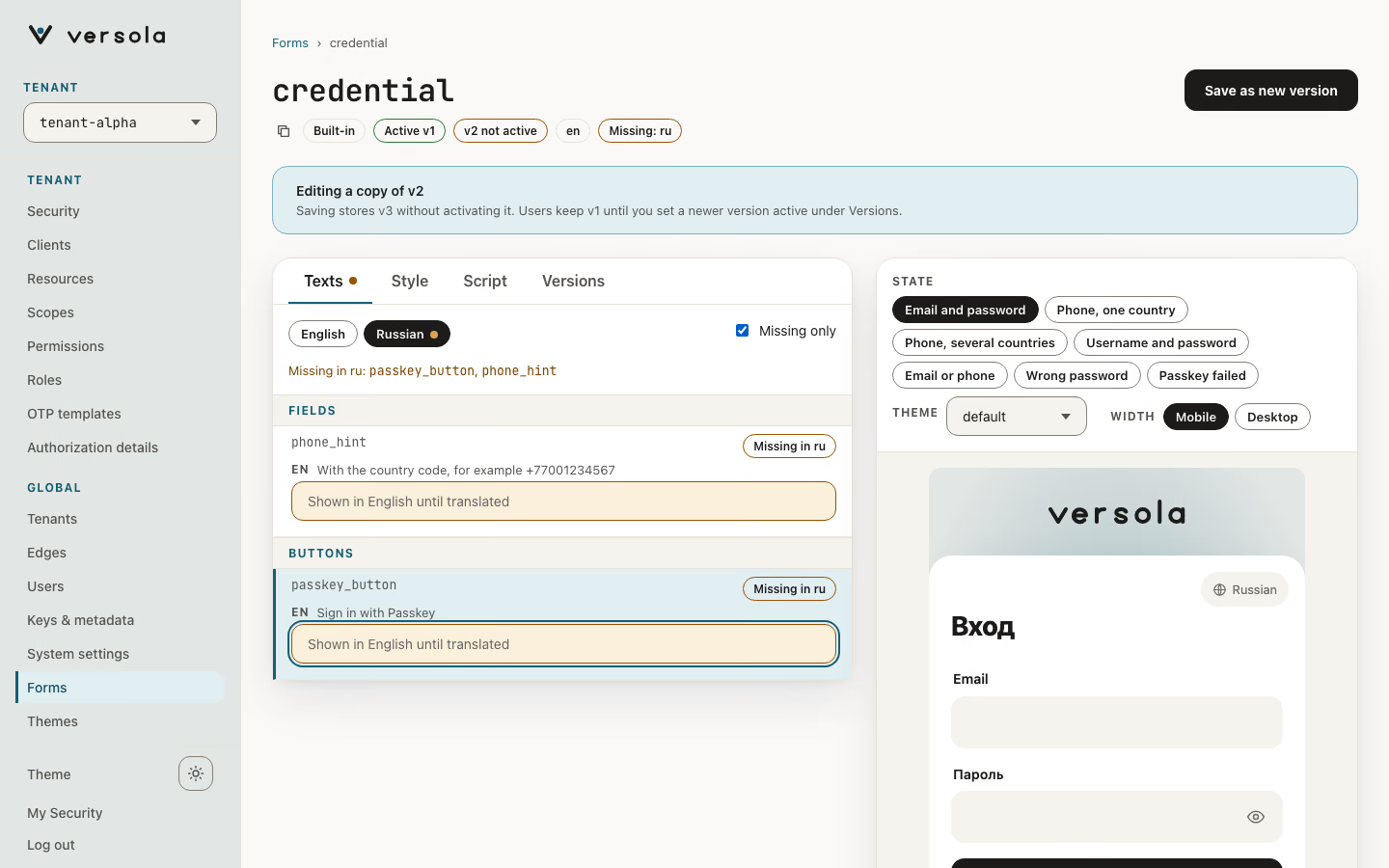
3. Type the translations
Type into each field. The preview on the right is in the language you edit: the text you are typing in has a dashed accent ring, and the English text of a key that is still missing has a dashed warning ring. Change State in the preview to see the texts of other situations, such as a wrong password.
4. Save and activate
Press Save as new version. A banner says what was stored: the version is not active yet, so visitors still get the previous one. Press Open versions, check the new version with Preview, then press Set active. auth picks the change up on its next configuration sync, not instantly. If the new version misbehaves, Set active on the previous one.